Once you’ve logged in to Cintra People HR, click Leave in the side menu.
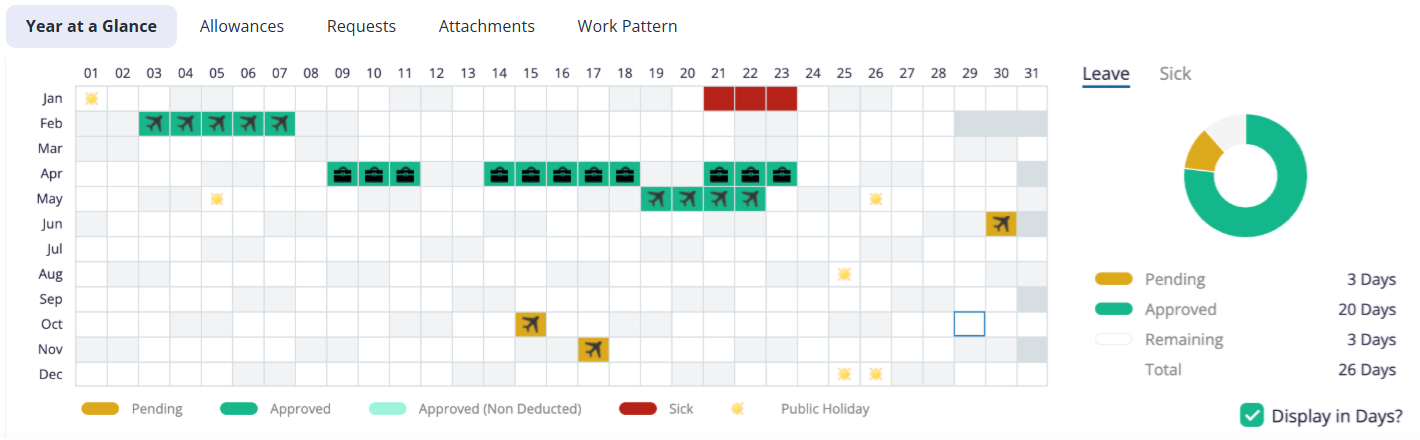
The Year at a Glance tab displays your both your holiday and sickness leave for the current year (you can change years by clicking the dates beside the New Request button)
Approved leave shows in Green.
Pending leave shows in Orange.
Sickness shows in Red.
The donut on the right displays how many leave days you have used, pending, approved etc. Click the Sick tab to view your total approved / pending sickness days.
The Leave Overview tabs also display other useful information including:
The Allowances tab displays your precise leave allowance for the year, including any accruals, broken down into hours / days. Click the
.png) icon to view exactly how your allowance is calculated.
icon to view exactly how your allowance is calculated. The Requests tab displays all pending, approved, rejected, and cancelled leave requests for the selected year.
Attachments: Any attachments added to leave requests will be shown here.
Team Calendar: View all the leave for everyone in your team for the current month. You can change which month you are viewing, as well as switching between a list and calendar view.
Working Pattern: Your allotted hours for each scheduled work day.
If you manage a team, see Manage employee leave for approving requests, team allowances, and team calendars.