Employment Allowance enables eligible employers to reduce their annual employer Class 1 National Insurance contributions.
HMRC allows employers to claim Employment Allowance retrospectively for up to four previous tax years, provided they satisfied the eligibility requirements for the relevant year.
If you did not claim Employment Allowance in a previous tax year, you can use RTI Corrections in Cintra iQ to amend the Employer Payment Summary (EPS) for that year and submit the claim to HMRC.
Maximum allowance by tax year
The maximum Employment Allowance available depends on the tax year for which you are claiming.
Tax year | Maximum allowance |
|---|---|
2022/2023 | £5,000 |
2023/2024 | £5,000 |
2024/2025 | £5,000 |
2025/2026 | £10,500 |
You can also view the latest rates on GOV.UK – Employment Allowance: Check if you can claim for previous years.
The amount you can claim is limited to your eligible employer Class 1 National Insurance liability for the relevant tax year.
Note: For claims relating to 2024/2025 and earlier, employers must also satisfy the previous tax year's £100,000 employer Class 1 National Insurance liability threshold. This threshold was removed from 2025/2026 onwards.
Before you make a claim
Before proceeding, you should:
Confirm that your organisation was eligible for Employment Allowance in the tax year concerned.
Check that Employment Allowance has not already been claimed for that year.
Review your employer National Insurance liability and determine the amount of allowance available.
Confirm that the relevant tax year falls within HMRC's four-year retrospective claim period.
Check whether any connected-company, multiple-PAYE-scheme or de minimis state aid restrictions apply.
It is the employer's responsibility to ensure that the claim is valid and meets HMRC's eligibility requirements. For more information, see Employment Allowance: Check if you can claim for previous years on GOV.UK.
Submitting a retrospective claim in Cintra iQ
Step 1: Access RTI corrections
Go to Cintra iQ > Payroll > Payroll Tools > HMRC > File by Internet, or click FBI in the menu bar.
Open the FBI Mailbox.
Click RTI Corrections to open the RTI Corrections and Amendments form.
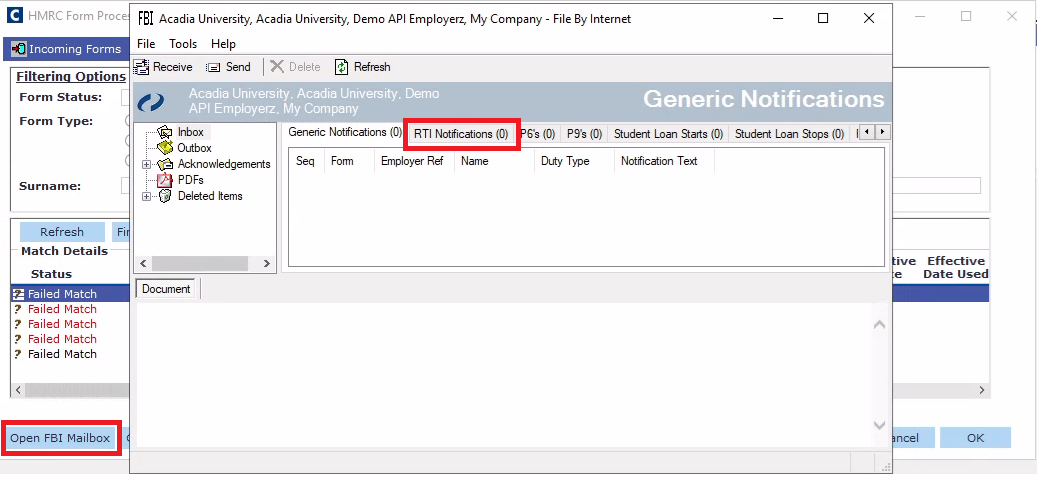
Alternatively, the EPS amendment process can be accessed through Outgoing Forms > Corrections within the FBI interface.
Step 2: Select the relevant tax year
Within the RTI Corrections and Amendments form:
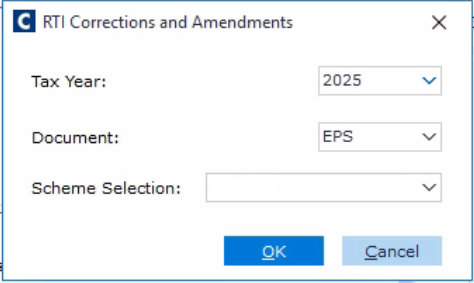
In the Supported Document list, click EPS (Employer Payment Summary).
Click the relevant PAYE scheme.
Click the Tax Year for which you want to claim Employment Allowance.
Click Find Latest Submission.
Cintra iQ displays the Employer Payment Summary form containing the information from the latest EPS submission for the selected tax year.
Step 3: Update the Employment Allowance claim
Within the Employer Payment Summary form, locate the Employment Allowance Claimed field.
The following options are available:
Option | Description |
|---|---|
Begin claiming | Notifies HMRC that the employer wishes to claim Employment Allowance. |
End claiming | Notifies HMRC that the employer is no longer eligible and wishes to stop claiming. |
No change | Retains the existing claim status without notifying HMRC of a change. |
To make a retrospective claim, click Begin claiming.
Review the remaining EPS information and ensure any applicable state aid details are correct.
Important: Do not amend other EPS values unless a separate correction is required. Employment Allowance is claimed using the appropriate EPS indicator rather than by entering the allowance amount as an adjustment to statutory payment recovery figures.
Step 4: Save and submit the amended EPS
Once the changes have been completed:
Review the EPS information.
Click Save.
Return to the FBI Mailbox.
Locate the newly created EPS correction in the outgoing submissions.
Review the submission and click Send to submit it to HMRC.
The amended EPS must be submitted for the correct PAYE scheme and historical tax year.
Step 5: Check the submission status
After submitting the amended EPS:
Review the FBI Mailbox for the submission status.
Confirm that the submission has been successfully received and accepted by HMRC.
Retain the submission acknowledgement for your records.
Review your HMRC PAYE account to confirm that the retrospective claim has been processed.
HMRC's confirmation and rejection process below can also be found on GOV.UK – Employment Allowance: After you've made a claim.
HMRC does not normally issue a confirmation letter for an Employment Allowance claim. If the claim is rejected, HMRC states that an automated notification will normally be issued within five working days.
Recovering the previous year's allowance
A retrospective Employment Allowance claim does not automatically mean that the employer will receive a payment directly through Cintra iQ.
Where employer National Insurance has already been paid for the previous tax year, HMRC will need to account for the retrospective allowance against the employer's PAYE liabilities.
Employers should review their HMRC PAYE account and contact HMRC where necessary to establish how any resulting credit or repayment will be handled.
Any corresponding payroll accounting or reconciliation adjustments should be reviewed separately to avoid duplicating the allowance or incorrectly adjusting historical payroll liabilities.
How HMRC applies the allowance (offset against liabilities or refund) is also on GOV.UK – Employment Allowance: After you've made a claim.
Important information
Employment Allowance must be claimed separately for each eligible tax year.
The allowance applicable to the historical tax year must be used.
Retrospective claims must be submitted through an EPS for the relevant year.
An FPS or Earlier Year Update is not required solely to begin an Employment Allowance claim.
The employer is responsible for confirming eligibility and calculating their entitlement.
Changing the current tax year's Employment Allowance setting does not replace the requirement to submit the appropriate historical EPS.
Always check that HMRC has accepted the submission before considering the claim complete.