How do I classify addition headings?
Before you create a snapshot, you can define which payment headings make up Ordinary pay or Bonus pay by classifying each relevant payment heading as Ordinary or Bonus. You can review and amend this using the Gender Pay Gap - Addition Heading Classification window. 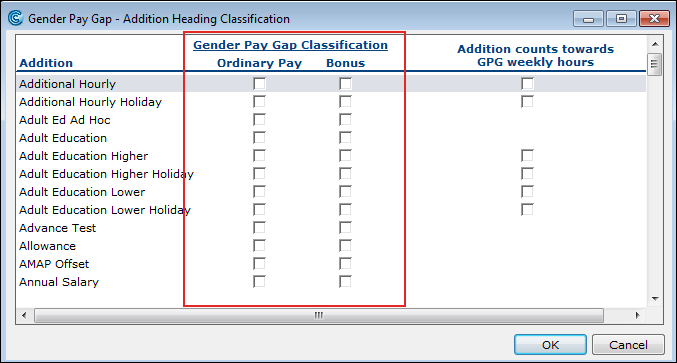
Name | Description |
|---|---|
Addition | These payment headings are set up in Payroll > Payroll Setup > Adjustments > Addition Headings. |
Gender Pay Classification | Select any pay element that should be included as Ordinary Pay or Bonus Pay. |
Addition counts towards GPG Weekly Hours | Applicable to Units & Rates Addition Types only. Picks up actual hours worked from a payment heading. For more information, see How are normal Weekly Hours established? below. |
The snapshot extract sums all amounts of pay due to the employee under these headings. Once the pay is summed, it is converted into a weekly amount of pay.
Annual bonus
When the snapshot is created, payments made under Bonus headings during the year leading up to the snapshot date, will be summed to form the annual bonus figure for each employee.
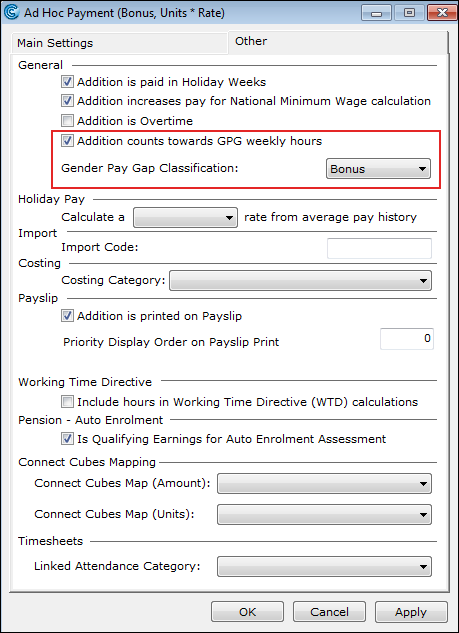
Note: You can also classify Ordinary payment and Bonus for individual payment headings within Cintra iQ's Addition Headings. Go to Cintra iQ: Payroll Payroll Setup Adjustments Addition Heading
How is ordinary pay converted into weekly pay?
Ordinary Pay is converted as a weekly amount of pay as follows:
Payroll Periodicity | Period Pay to Weekly Pay Conversion |
|---|---|
Monthly | (Period Pay / 30.44) x 7 days |
Weekly | Period Pay |
Fortnightly | Period Pay / 2 |
Lunar | Period Pay / 4 |
How is bonus pay converted to weekly bonus pay?
The same calculation is applied to period bonus pay. However, for Bonus payments in the period, the dates recorded against the bonus payment are used to pro-rata the bonus where the dates extend longer than one period.
Example scenario 1: Weekly bonus pay for a monthly period
If a bonus of £1500 was given to an employee during the snapshot period and the dates recorded against this bonus 01/02/2017–30/04/2017, then the weekly bonus will be £116.27 for the month of April.
1500/89 (days) = £16.85 (daily bonus rate)
16.85 * 30 (days in snapshot period) = £505.61 (monthly period pay snapshot)
[505.61/30.44 ] x 7 (days) = £116.27 (weekly bonus conversion)
Example scenario 2: Weekly bonus pay for a monthly period
If a bonus of £500 was given to an employee during the snapshot period and the dates recorded against this bonus 01/04/2018–10/04/2018, then the weekly bonus will be £344.94 for the month of April.
500/10 (days)= £50 (daily bonus rate)
50*30 (days in snapshot period) = £1500 (monthly period pay snapshot)
[1500/30.44 ] x 7 (days) = £344.94 (weekly bonus conversion)
Note: If you have awarded bonus payments in the snapshot period but the dates against the payment are not reflective of the time the payment was due, then you may need to override the weekly bonus pay in the snapshot extract.