For users accessing Cintra iQ via the internet, it's essential to end both the Cintra iQ and the internet sessions correctly. Here's a step-by-step guide to help you navigate this process.
Logging Out of Cintra iQ:
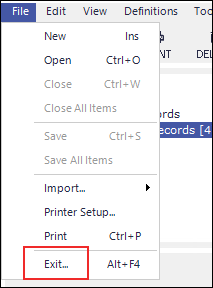
Access the 'File' Menu
Navigate to the top left corner of your Cintra iQ interface, and select 'File'. A dropdown appears.
Choose 'Exit'. This action will close your Cintra iQ session.
Note: Just clicking on the X to come out of the internet browser does not tell the Cintra iQ session you have finished, so when you try to gain access again, it thinks you are already in and fails to open up a new session.