Normally, if you have not performed an auto enrolment assessment before creating the payment run, you will receive an auto enrolment reminder stating: The Auto Enrolment Assessment has not been carried out for the period. You can hide the message.
To hide the reminder message
Navigate to the Employer window. The Employer definition window appears.
Go to Cintra iQ: Payroll > Payroll Setup > Employer Setup
Select the desired Employer definition.
Click the Open button. The Employer window appears.
Navigate to the PAYE & Payrolls tab.
Open an existing payroll associated with the selected PAYE scheme. The Payroll window appears.
Navigate to the Additional Settings tab.
Navigate to the Other Settings section.
Click the AE Pension Settings button. The Pension Scheme - Auto Enrolment form appears.
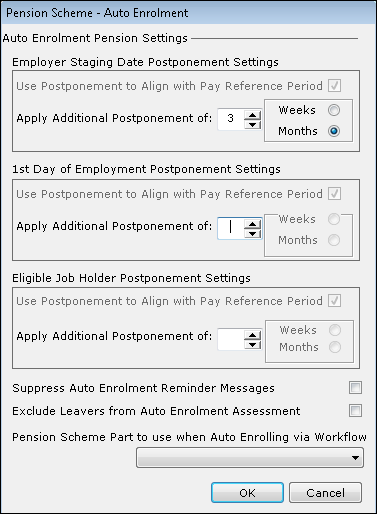
Click the Suppress Auto Enrolment Reminder Messages check box.
Click the OK button.