The HMRC payment run Due Date is the date HM Revenue and Customs will receive your PAYE liability payment. To ensure this date is correct and to remove the risk of penalty for late payment, you need to ensure this date is correctly set up on Cintra iQ.
Navigate to Payroll → Payroll Setup → Third Party Associations.
In the Third Party Associations window, open the plus next to HMRC and select Accounts Office Cumbernauld.
In the 'Payment Settings' tab, select the pay date. Cintra iQ will then calculate the HMRC BACS payment due date based on this selection, typically processing payments for the due date on the 20th day of the following month.
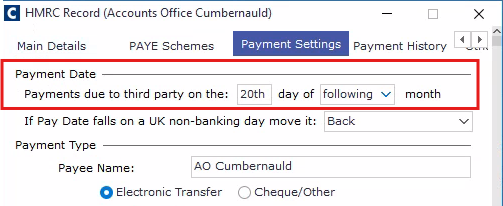
Note: This payment should always be set as Electronic Transfer.