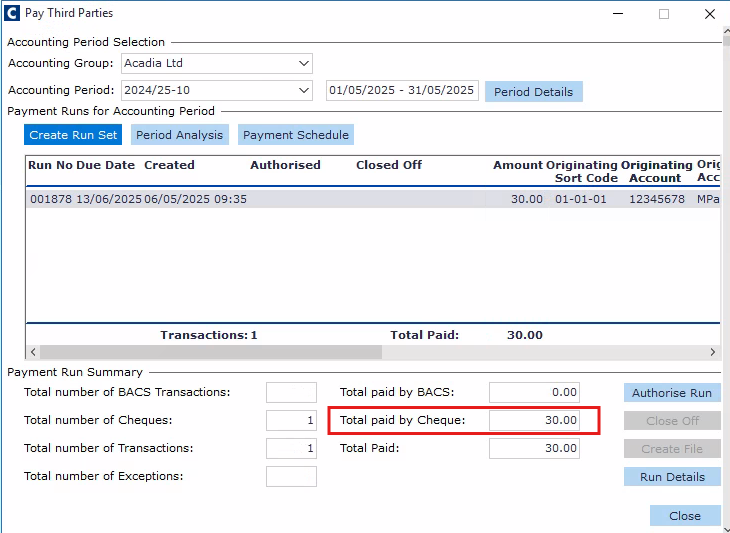
When third-party payment is generally activated for BACS within Cintra Cloud, you can still exclude specific third-party providers so their payments will be processed outside of BACS.
If you wish to do the BACS payment for some third-party associations but not for all, you have the ability to change the payment method to a cheque/other for those paid outside the BACS.
Navigate to Payroll → Payroll Setup → Third Party Associations.
In the Third Party Associations window, find your provider.
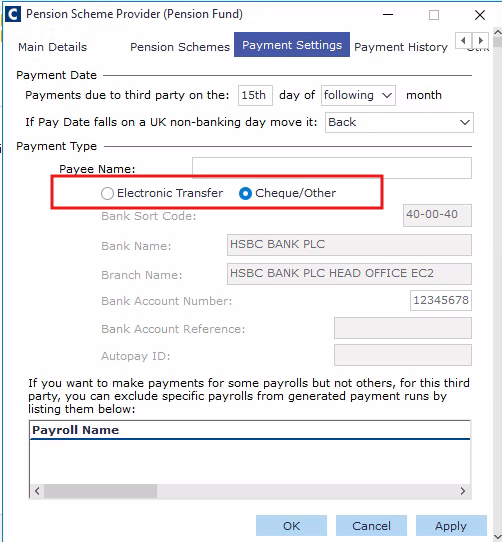
In the 'Payment Settings' tab, locate the Payment Type section and select the Cheque/Other radio button.
Note: When you create a payment run for this third-party provider under the 'Cheque/Other' setting, the 'Total paid by Cheque' amount in the payment run summary will show the value for this provider, and the 'Total paid by BACS will show as zero.