A Menu Security Definition is made up of one or more menu items to which you can restrict access. Once the Menu Security Definition is created, you can apply it to one or more Security Profiles, which can be assigned to a user.
Important: You must have System Administration permission in order to access this functionality. Go to Cintra iQ: System Administration Manage Security Define Security Profiles
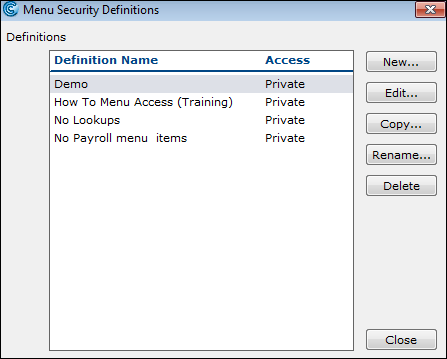
About the Menu Access Definition window
Within Menu Access Definition, you can perform the following:
Enable All of the Menus
Restrict All of the Menus
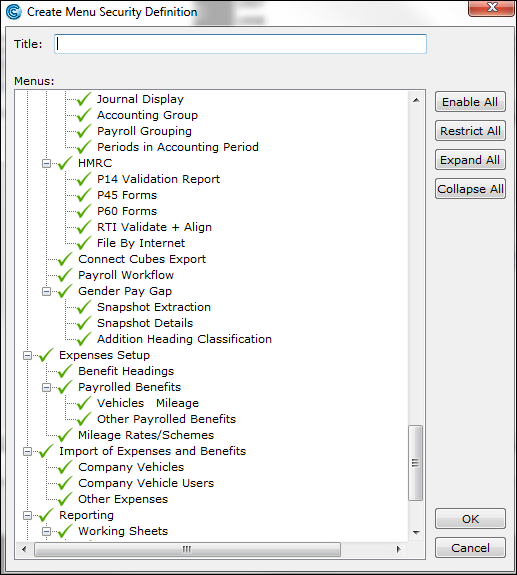
Name | Description |
|---|---|
Title | Enter the title of the Menu Security definition. |
Menus Pane | This pane contains all of the menus that are available in Cintra iQ. |
Buttons
Use the following buttons to perform various tasks.
Name | Description |
|---|---|
Enable All | Click this button to make all the items in the Menus pane fully accessible. |
Restrict All | Click this button to make all the items in the Menus pane read only. |
Expand All | Click this button to expand the tree structure in the Menus pane |
Collapse All | Click this button to collapse the tree structure in the Menus pane. |
How do I restrict menu access?
You can create a security definition that restricts access to particular menus.
Navigate to the Menu Security Definitions window.
Click the New button. The Create Menu Security Definition window appears.
Enter a Title.
Toggle on a menu item to restrict it.
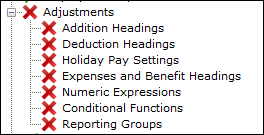
Note: To save time, you can double click on the top level menu and this will restrict the subordinate menus as well.
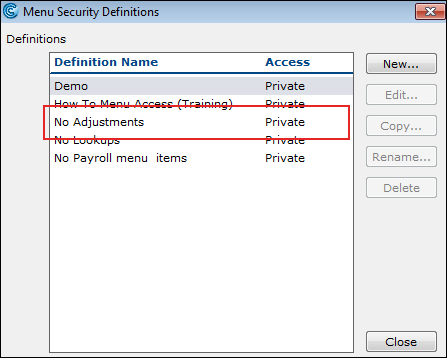
Click the OK button. The definition appears in the Menu Security Definitions window.
Continue Setting Security Profiles Setting Security Profiles.