Payroll queries usually come down to one question: what changed? Until now, answering that meant piecing together information from memory, emails, or separate change logs. The new Payroll Audit Report brings that answer together in one place, showing every change made to a payroll record, when it happened, and who made it.
What's new?
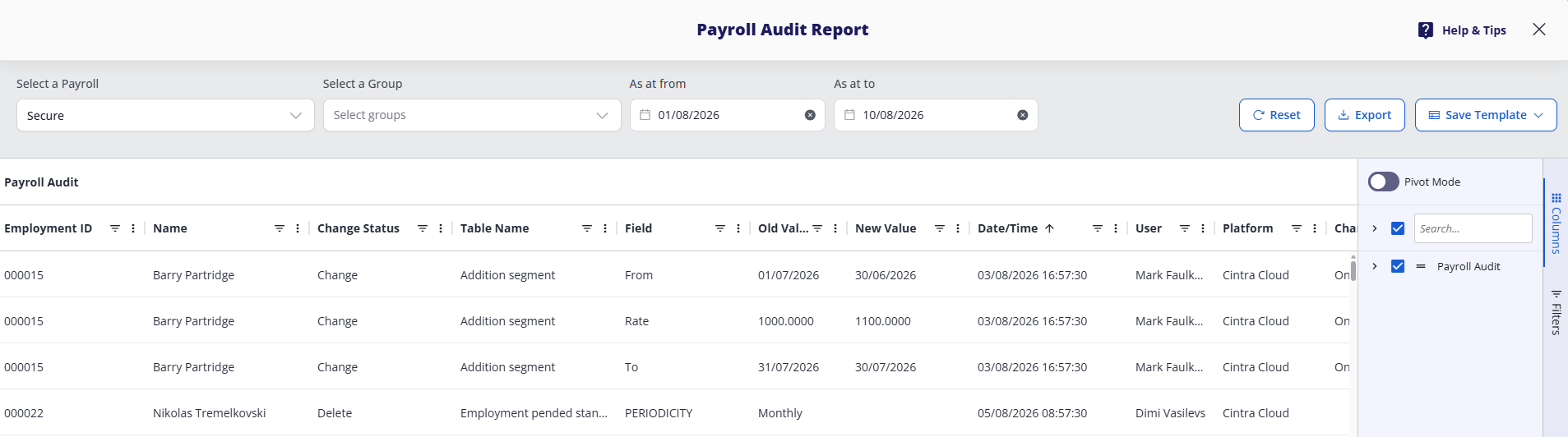
The Payroll Audit Report is a searchable, filterable log of every change made across payroll. You can:
Select a payroll to narrow the results.
Choose an As at from and As at to date range to see every change recorded in that window. It opens on the current month by default.
View each change as a row showing the employee, the field that changed, the old and new values, the date and time, the user who made the change, and the platform it was made on.
Key Benefits
Pick your own dates. Choose any date range and see every change recorded within it.
See the full picture. Each row shows the employee, the field that changed, the old and new values, the date and time, and the user who made the change.
Resolve queries and evidence your audits. Export the results and you have your answer, or your audit trail, ready to send.
What next
The Payroll Audit Report is available now from the new Audit tile on the Reports page, or from any individual payroll. It's only visible to users with full payroll access, covering both payments and employment details.
For more general information on reports, see Payroll reporting and dashboards.