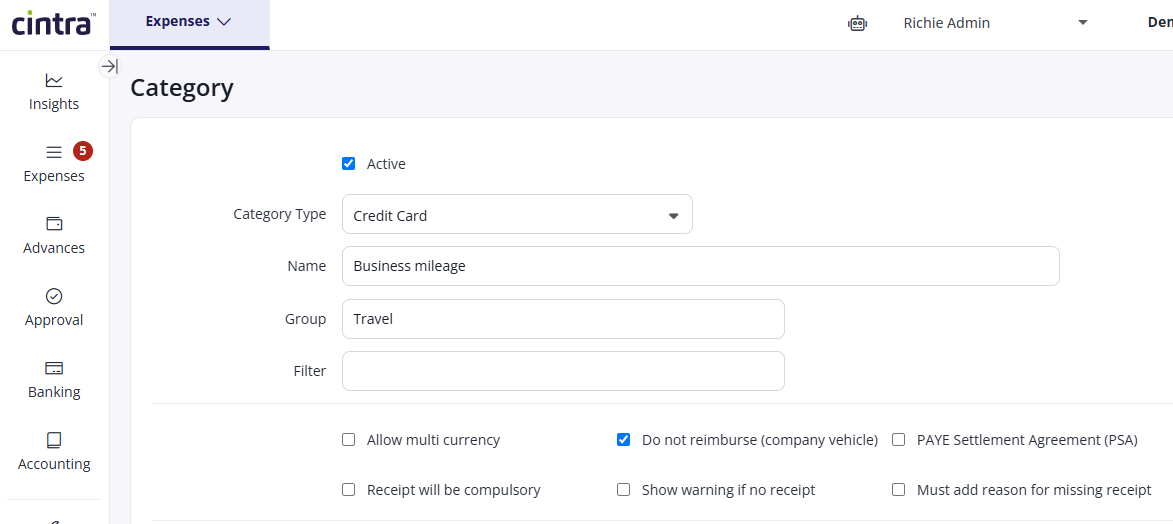
If your organisation uses company cars with fuel cards, business mileage claims are raised to track mileage rather than to reclaim money, i.e. the fuel cost has already been covered. Where this applies to your entire fleet, you can set your Business Mileage category to not reimburse, rather than paying out claims that don't need paying. This also reduces the claim amount to zero.
Before you exclude the category: this only works if every claim under the category is for company car mileage. If any employees use their own personal car for business journeys, they need a separate, reimbursable category for that mileage – don't route personal-car claims through the same category you're about to exclude, or those employees won't be paid.
Excluding the category from export
If you already have a mileage-related category and need to stop reimbursing it:
Go to Setup > Categories.
Click the Edit icon on relevant mileage category.
Select Do not reimburse (company vehicle).
Click Save.