Who can do this:
HR Manager
If an employee leaves the business, you will need to process their offboarding to ensure any pending actions are dealt with, and to ensure that the employee no longer has access to the system after their end date.
You must do several things before you can archive an employee.
When you have been told that an employee is leaving and to initiate the offboarding process, add their end date.
Go to Organisation > Employees > open the employee > Employment tab > Dates tab.
Click the edit button beside Employment End Date.
.png)
A window will appear where you can add the employee's End Date.
If the End Date is less than 30 days away, you will be taken to the Employee Offboarding Actions.
If the End Date is more than 30 days away, you do not need to do anything yet. The system will notify you when the employee has moved into Offboarding status - 30 days prior to their End Date.
If the End Date is in the past, the system will automatically check for any necessary items before prompting you to process these immediately. The Employee Status will change to Former.
.png)
The Offboarding Actions page will show you any Required & Optional Actions. Scroll down the page to view the necessary items.
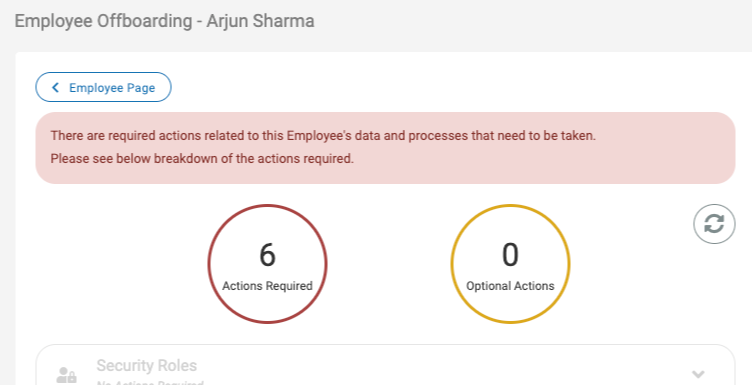
Follow the prompts on the screen to process the actions.
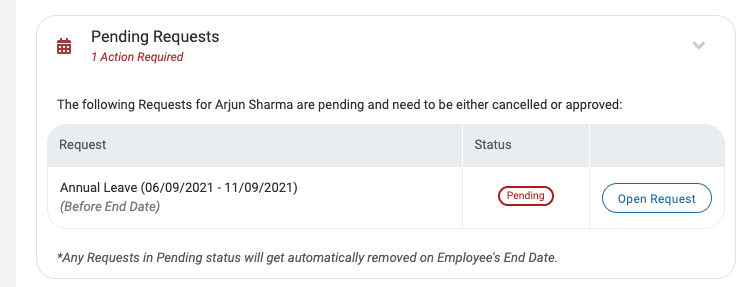
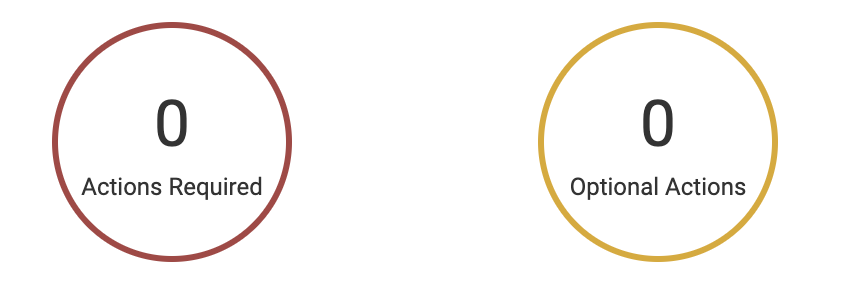
Once all Mandatory Actions have been completed, the employee offboarding will be completed.
At the end of the employee's last working day, their access will be revoked and they will no longer be able to log into Cintra People HR.
Their employee status will change to Former and other employees won't be able to view them in calendars. HR Managers will still have access to Former employees until their accounts are no longer required and they can be archived.
If you navigate away from Offboarding, you can return by going to Organisation > Employees > Select Employee > Employee Profile > View Offboarding Actions.
.png)
For information about archiving employees, please take a look at the following article: Archived Employees.