There are two types of mileage claim you can raise
Private mileage expense: when you use a company vehicle away from work
Business mileage expense:
In either the web or mobile, open the Expenses section.
On mobile, this will automatically create a new claim. On web, click + Manual Expense.
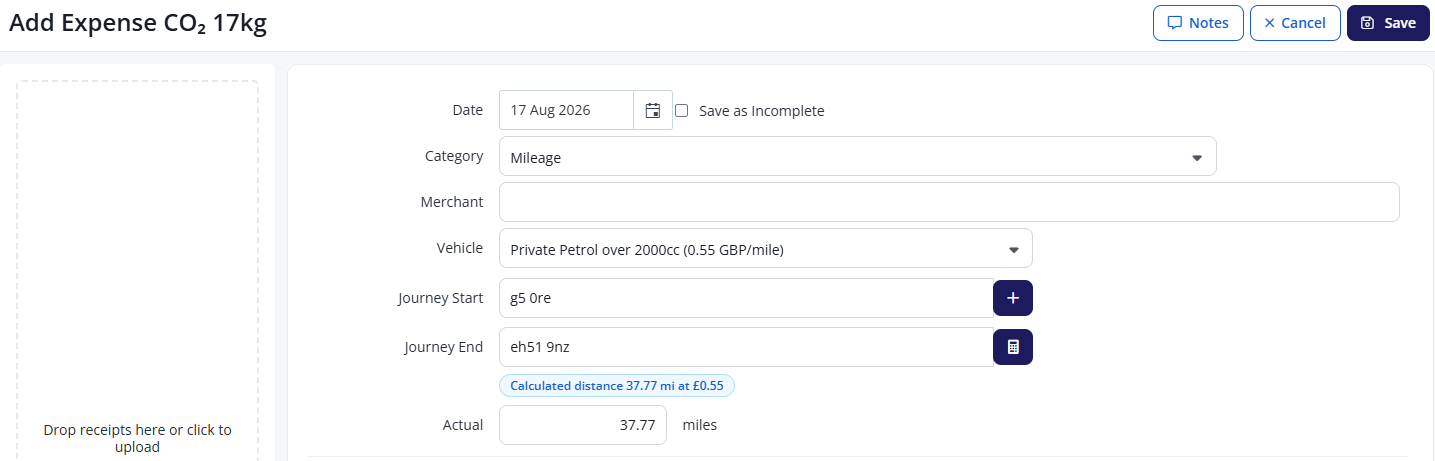
Select the appropriate mileage expense category. This will usually be found in the Travel section.
Merchant is used to record who has sold you the goods / services.
Enter information about the Vehicle and Journey Start / End.
If you want to add waypoints, click the + icon.
Select a Commute of one or two ways, or not at all. Depending on your organisation’s preferences, you may not be able to edit this.
The Actual distance will be calculated, although you can change this if required.
On web, enter whether you have a VAT receipt, the rate, and the amount paid. You may also need to add a receipt to the section on the left.
On mobile, if you have a VAT receipt, tap Yes for VAT Receipt and attach it to the claim by tapping Receipts.
Enter any other relevant information, then Save. Your expense claim will be added to your draft expenses.
.png)
Submitting vehicle documents
Your organisation may require you to provide vehicle documentation before submitting any related claims. See Submitting a vehicle document.