To view all your expense claims.
Click Expenses in the side menu.
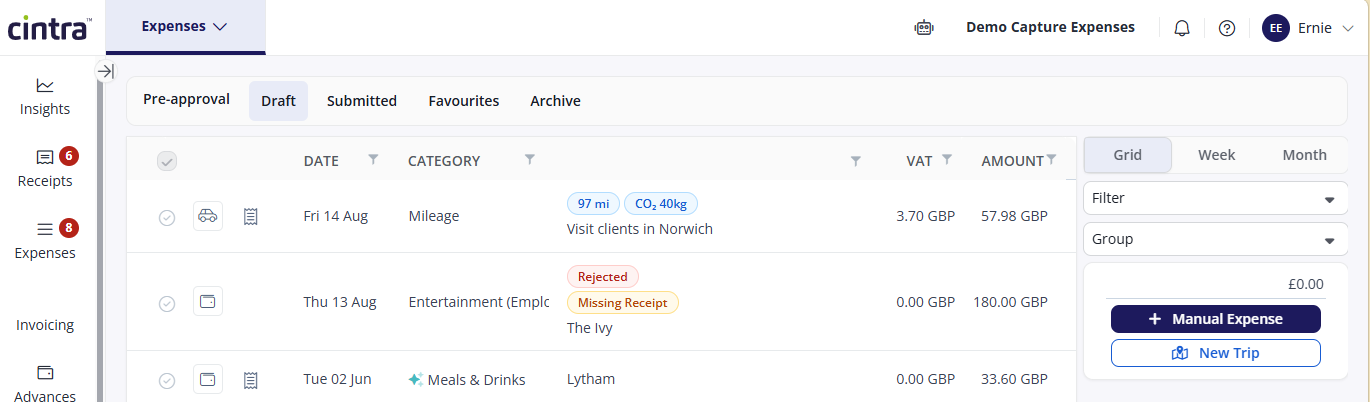
The Expenses section has the following tabs:
Pre-approval: Expenses that are approved before any funds are spent.
Draft: Expenses that you haven’t yet submitted. The symbol indicates what type of expense it is (e.g. mileage, cash)
Submitted: View whether each expense has been approved or rejected.
Favourites: If you re-use the same expenses, you can mark them as favourite, then re-use them.
Archive: You can filter the list of archived expenses by date, amount, description etc.
The following icons can appear beside expense claims:
.png) - This expense claim has one or more receipts. Click the icon to view the receipt.
- This expense claim has one or more receipts. Click the icon to view the receipt. .png) - This is a cash expense.
- This is a cash expense..png) - This is a mileage claim.
- This is a mileage claim.