In Cintra iQ, you may want to record an absence when entering a calendar event for a particular attendance category. To do so:
Go to: Definitions > Lookups. The Lookup Administration window appears.
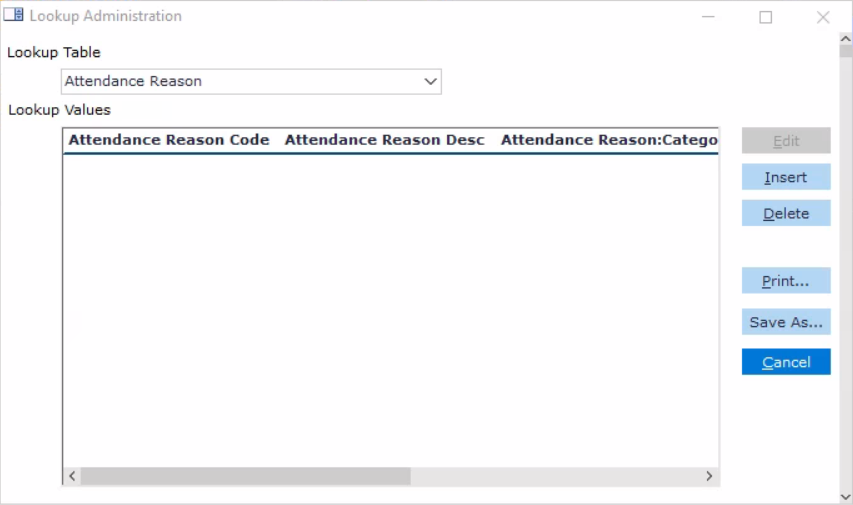
Select Attendance Reason from the Lookup Table dropdown.
Click the Insert button. The Attendance Reason form appears. You can associate the Reason to a Category so that only the associated reasons can be selected.
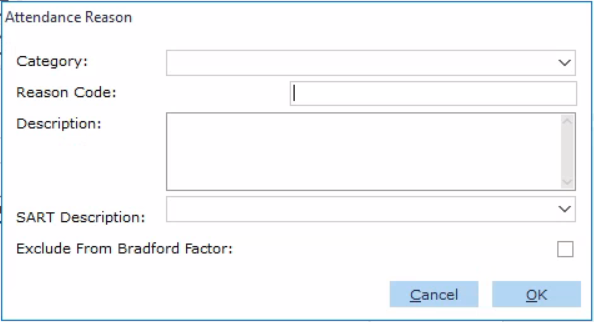
Select the Category.
Enter a Reason Code & Description.
Click OK.
Note: Both the SART and Exclude From Bradford Factor options are used in association with Sickness Reasons within Cintra iQ. The attendance reason is created and can be selected from the Absence record. For more information about absence records, see How Do I Create Calendar Events?