Cintra iQ calculates statutory student loan and postgraduate loan deductions in line with HMRC requirements.
An employee can only have one active student loan plan at a time in Cintra iQ, even if they have more than one outstanding student loan. They can also have one active postgraduate loan alongside that plan, because HMRC treats postgraduate loans as a separate loan type.
One student loan plan at a time
An employee may have outstanding balances under more than one student loan plan, such as Plan 1 and Plan 2. Even so, HMRC requires employers to make deductions under only one plan at a time, so Cintra iQ allows only one active student loan plan per employee.
This means an employee can't have two of Plans 1, 2, 4 and 5 active at the same time, for example Plan 1 and Plan 2, or Plan 2 and Plan 4. Where HMRC tells you to change the plan, replace the existing plan with the new one.
If an employee has more than one student loan plan, HMRC's guidance explains which plan to deduct under, including before you receive an SL1 notice. See Student loan and postgraduate loan repayment guidance for employers.
Student loans and postgraduate loans together
HMRC treats student loan plans and postgraduate loans as separate loan types, so an employee can repay one student loan plan and a postgraduate loan at the same time.
Loan combination | Allowed |
|---|---|
Two student loan plans (for example, Plan 1 and Plan 2) | No |
One student loan plan (Plan 1, 2, 4 or 5) and a postgraduate loan | Yes |
Where both apply, Cintra iQ calculates each deduction separately using its own threshold and deduction rate. For the current thresholds and rates, see Viewing statutory rates.
Setting up or changing an employee's student loan
Student loan details are held on the employee's Tax and NI form, not in Deductions.
Go to Cintra iQ > Employment Record > Forms > Tax & NI > Tax tab and click Student Loans.
SL1 and SL2 notices downloaded through FBI are applied to the employee automatically. For more information, see Downloading HMRC notices.
For new starters, the student loan type is recorded on the starter forms in the Tax Code History pane. For more information, see Tax and NI details.
Replacing student loan repayment plans
If you need to start a student loan repayment plan while there is already one in place, you should end the previous one, then start the new one for the next day. To do this:
Go to Cintra iQ > Employment Record > Forms > Tax & NI > Tax tab and click Student Loans.
Open the student loan repayment that is set to end.
Add a Stop date, then click Save.
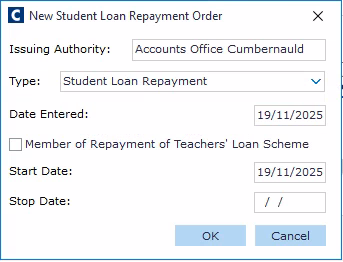
Right-click in the Student Loan Repayment Orders screen, click New, then add the details of the new repayment.
Set the Start Date to be one day after the previous repayment’s Stop date.
Warning! While it is also possible to delete the previous repayment plan rather than ending it, this can cause a series of unexpected corrections to be implemented.
Receiving a new SL1 notice
If you receive an SL1 notice identifying a different student loan plan, review and update the employee's student loan details in Cintra iQ so that the new plan becomes the active plan from the next available payday. The previous plan should no longer be deducted alongside the new one.
Example: An employee is repaying a Plan 2 student loan. HMRC then issues an SL1 notice instructing you to use Plan 1. You update the employee's student loan details so that Plan 1 becomes the active plan from the next available payday, and Plan 2 deductions stop.
Don't make deductions retrospectively to recover amounts for earlier periods just because a new SL1 notice has been received.
See also on GOV.UK: Student loan and postgraduate loan repayment guidance for employers
Stopping student loan deductions
Continue making student loan deductions until HMRC tells you to stop. This is normally through an SL2 stop notice.
Important: An employee telling you their loan has been repaid is not enough on its own to stop deductions.
When you receive an SL2 notice, update the employee's student loan details and stop deductions from the first available payday after the stop date HMRC specifies. You can enter a stop date in the Student Loans window on the Tax tab.
See also GOV.UK – Student loan and postgraduate loan repayment guidance for employers.
Student loans and company loans
The Loan Repayments section (Employment Record > Forms > Deductions > Loan Repayments) is for company loans, such as season ticket, travel or equipment loans. Don't use it for statutory student loan or postgraduate loan deductions.