The payrolled benefits statement summarises an employee's payrolled benefits for a tax year, including company cars and vans and mileage allowances. It's view only, so you can't change any benefits from it.
Salary sacrifices and benefit costs aren't included in the statement. To add or manage payrolled benefits, see Benefits: Benefits in Kind.
Important: The statement only includes payroll periods that have been processed. A benefit you've just added won't appear until a payroll period that includes it has been processed, or until you recalculate the payroll.
Viewing the statement
Open a payroll, select the employee, then click the Benefits tab.
In the Payrolled benefits section of the Benefits in kind tab, click Benefits statement.
If the button is greyed out, there's nothing to show on the statement yet.
Select the tax year you want to view. You can view the five most recent tax years the employee has been paid in.
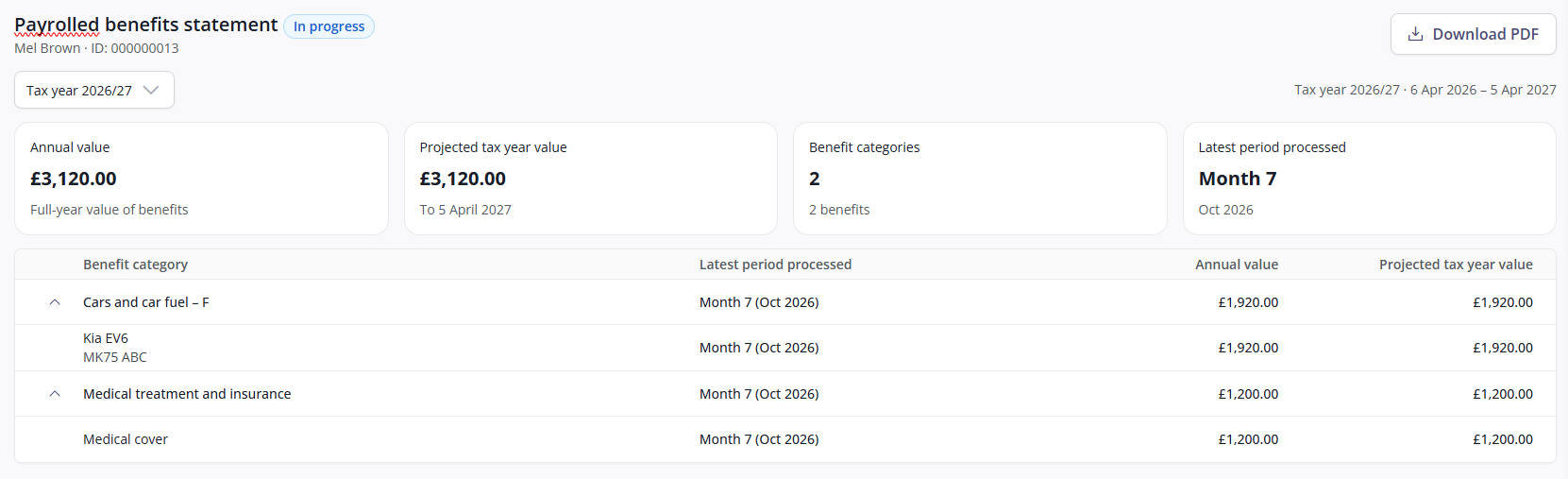
The badge next to the statement's title shows whether the tax year is complete:
In progress: Some payroll periods in the tax year are still open.
Final: All payroll periods in the tax year are closed.
What the statement shows
The tiles at the top of the statement summarise the employee's benefits for the selected tax year:
Tile | What it shows |
|---|---|
Annual value | The full-year value of the employee's benefits. For each benefit, this is the annual amount entered, or the per period amount multiplied by the number of payroll periods in the year. |
Projected tax year value | The total value expected to be taxed by 5 April. It assumes the employee's current benefits continue to the end of the tax year, so it changes as further periods are processed. |
Benefit categories | The number of HMRC benefit sections the employee's benefits fall into, with the total number of benefits underneath. |
Latest period processed | The most recent payroll period processed in the tax year. |
The table below the tiles breaks these figures down by HMRC benefit section. To see the individual benefits in a section, click the chevron next to it.
Company cars, vans and mileage allowances each show their own projected tax year value. For other benefits, the projected value is only shown for the section as a whole, so individual benefits show —.
Downloading the statement
To download the statement for the selected tax year, click Download PDF.
FAQs
Why isn't a benefit showing on the statement?
The statement only includes payroll periods that have been processed. If you've just added the benefit, it appears once a payroll period that includes it has been processed, or once you recalculate the payroll.
Salary sacrifices and benefit costs aren't included in the statement.
Why is a benefit listed under Uncategorised?
Its payroll heading hasn't been given an HMRC benefit section in Cintra iQ. Once it has, the benefit is listed under that section instead.
What should I do if a figure on the statement looks wrong?
First check the benefit’s details, especially its start date. If a benefit is missing, or was set up with the wrong start date, add / edit it with the correct start date and recalculate the payroll. The calculation automatically includes any earlier periods affected, even if they’ve already been processed, and the statement updates to show the corrected figures.