Positions define the roles in your organisation. Each position holds the details used to calculate pay and costs, such as the job title, contract type, working hours and cost allocation. Positions can be assigned to employees, and the information held against a position is used in calculating salaries and related costs.
You manage positions from Settings > Position management in the Payroll menu.
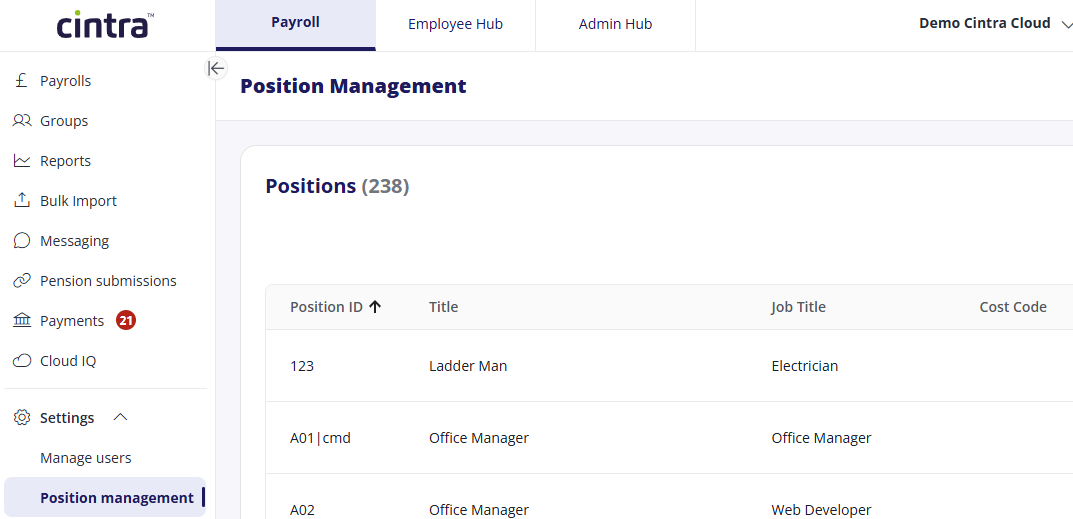
Viewing positions
The Position management page lists every position, with a count of the total. Each row shows the key details for a position.
You can sort the list, set how many positions appear per page, and page through the full list. Select the vertical ellipsis (⋮) at the end of a row to edit that position.
Adding and editing a position
Select Add new to create a position, or the ellipsis (⋮) then edit to change an existing one. Both open the Position details form, where you enter:
Position ID: the unique reference for the position
Position title
Job title: Select from the drop-down list. This list is maintained in Cintra iQ.
Descriptiont
Start date (created) and End date (withdrawn): the dates the position becomes active and, where relevant, is withdrawn
Contract type: permanent or temporary
Default cost account and Default cost department: where the position's costs are allocated by default.
Increment periodicity – how often the position increments, ranging from three-monthly to three-yearly.
Select Save & continue to save the position