You can configure how payments are processed for each customer. This means you can set up different payment options for salaries, HMRC, and Third Parties.
Go to the Organisations page.
Click the cog icon
 to the right of the customer you want to configure, then click Payment settings.
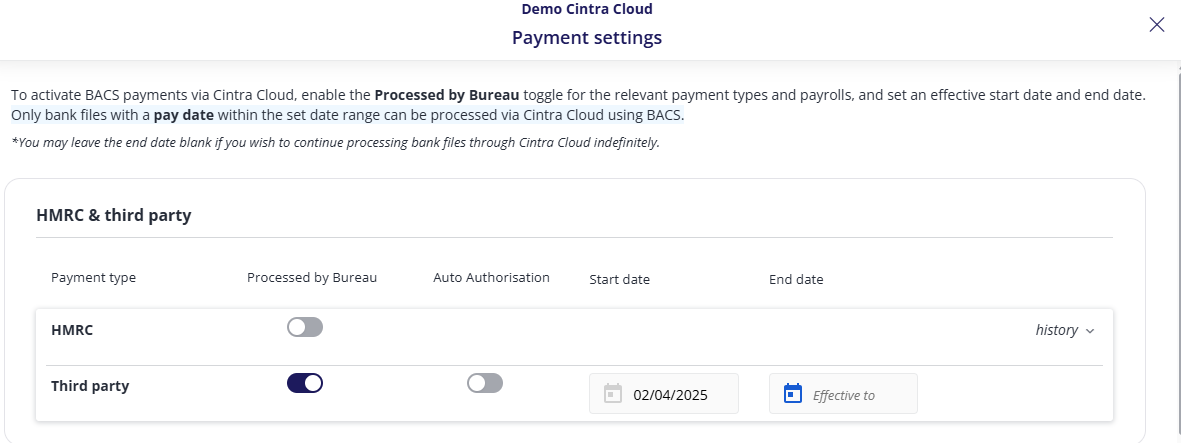
Next, you must decide who will manage BACS payments.
If you want to enable BACS payments to be processed by the Bureau, activate the toggle under the Processed by Bureau column. You can do this for each payroll listed as well as for the HMRC and Third party payments.
When the toggle is activated, the start date will be auto-populated, but this can be changed to any date after the populated one.
You can also put the end date if you know that the BACS payment is being processed for a specific period only. Otherwise, leave the end date empty for any ongoing payments.
You can see previous active BACS periods under the history drop-down.
Important: If the customer prefers to manage their own BACS payments, do not activate any toggles under the ‘Processed by Bureau’ column for HMRC, third party, or any payrolls listed.
You can enable auto-authorisation for liability payments. For HMRC or Third Party payments, when you activate the toggle for BACS to be Processed by Bureau, you can also activate Auto Authorisation.
This means that the client will not be required to authorise payment for those liabilities as it will be system-authorised as soon as the payment run is closed on Cintra iQ.
Note: Auto Authorisation is not available for Salary payments.
5. Click Save to save your settings.