Available in:
HR Advanced
Who can do this:
HR Manager
About
Your Company Values can be stored in Cintra People HR, so employees can easily view and understand them. For each value, you can add a value title, a description and an image to represent the value.
.png)
Setting up Company Values
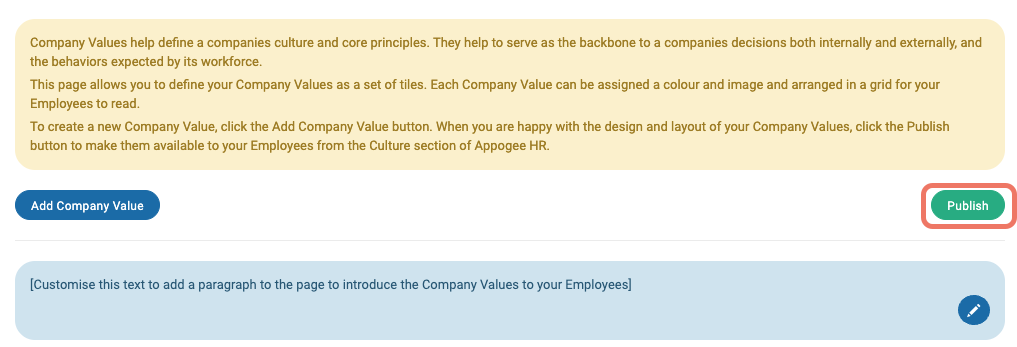
The Company Values area is disabled to employees until you've configured the values and are ready to publish them.
To do this, go to Culture > Admin & Config > Company Values.
Click the Add Company Value button to create your first value.
Give your Value a Title and Description and choose a colour, go to the Image tab to optionally upload a picture to the value then go to the Size tab to choose how the value displays to employees.
Click the Add Company Value button.
Repeat this process for all Company Values. Once you have added all Company Values you can optionally resize them and move them around, to give more prominence to key values or so the Values page looks more pleasing on the eye.
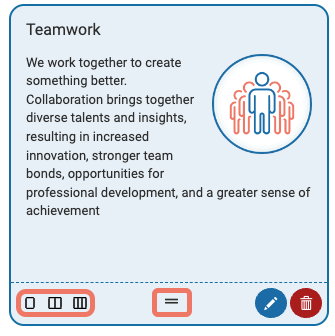
To resize a value, choose either single, double or triple space icon in the bottom left corner and to reorder the values, click the two lines in the middle of the value to drag and drop it into a new space.
You can also a welcome message to employees which aims to introduce the values or give employees more context when viewing the Company Values page. Click the blue pencil icon to update the welcome message.

When you're happy with your Values, click the green Publish button at the top of the page.