This article explains each part of an employee's neonatal pay claim: the claim dates, statutory neonatal care pay (SNCP), and what has been paid in each payroll period. For how claims are created, who can edit them and what the icons do, see Parental payments.
Statutory neonatal care pay can be paid for babies born on or after 6 April 2025 who spend 7 or more continuous days in neonatal care, starting within 28 days of the birth. It's paid for up to 12 weeks, and must be taken within 68 weeks of the birth.
There's no occupational (top-up) pay for neonatal care, so a neonatal claim has no pay schedule and no keep-in-touch days. Neonatal claims also have no exclusion reasons, so they never show an Excluded badge.
1. Neonatal claims list
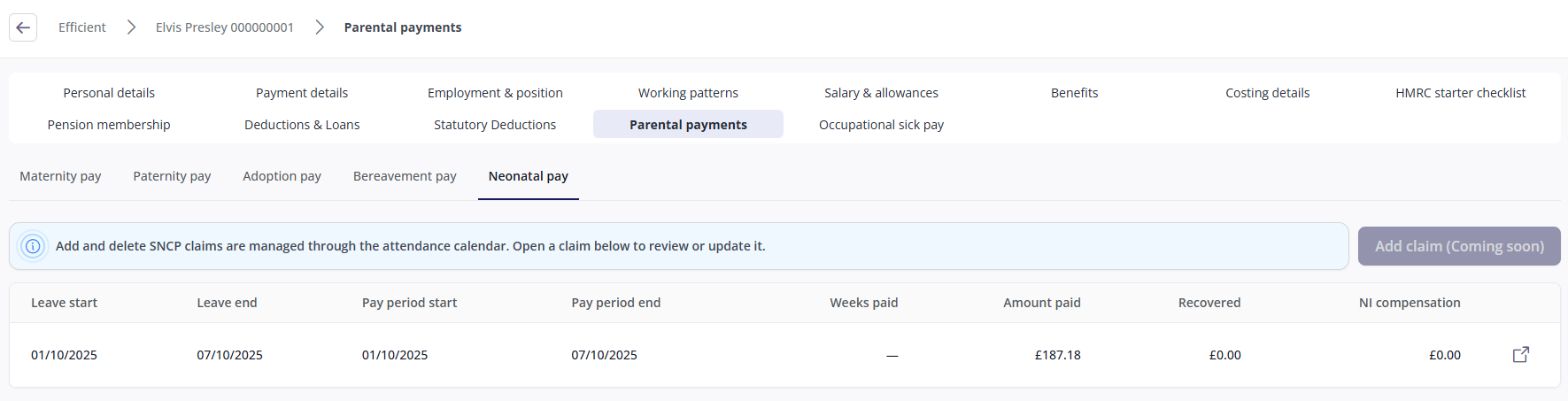
Open the employee's record and click Parental payments > Neonatal pay. Each row represents one claim.
Column | Meaning |
|---|---|
Leave start / Leave end | The neonatal leave dates recorded in the attendance calendar. |
Pay period start / Pay period end | The weeks SNCP is paid for. These often match the leave dates, but they can differ. A claim that's still in progress shows a dash for the pay period end. |
Weeks paid / Amount paid | The weeks and amount of SNCP paid so far. These show a dash until payroll has calculated the claim. |
Recovered | The amount of SNCP you can reclaim from HMRC. |
NI compensation | The extra amount that employers who qualify for Small Employers' Relief can reclaim, as compensation for employer National Insurance. |
On a claim payroll hasn't calculated yet, Recovered and NI compensation show £0.00 rather than a dash.
Click anywhere on the row to open the claim page.
2. The claim page
The breadcrumb names the claim by its pay period, for example "SNCP claim (01/10/2025 to 07/10/2025)", or "ongoing" if the claim has no end date yet.

Each claim page has two tabs:
Tab | What it shows |
|---|---|
Neonatal dates | The leave dates, the birth dates and the SNCP pay period. |
Statutory neonatal pay (SNCP) | The SNCP summary, the relevant earnings, the week-by-week amounts, and what has been paid in each payroll period. |
3. Neonatal dates
The SNCP claim dates card shows the dates the claim is based on.
Field | Meaning |
|---|---|
Neonatal leave requested | The date the employee told you they wanted to take neonatal leave. |
Expected date of birth | The week the baby was due, which is used to work out the earnings period (see 6. Relevant earnings). |
Actual date of birth | The date the baby was born. This must be on or before the neonatal leave start date. |
Neonatal leave start / Neonatal leave end | The leave dates recorded in the attendance calendar. To change them, change the leave in the calendar. |
SNCP start date / SNCP end date | The weeks SNCP is paid for. These are set by the system. |
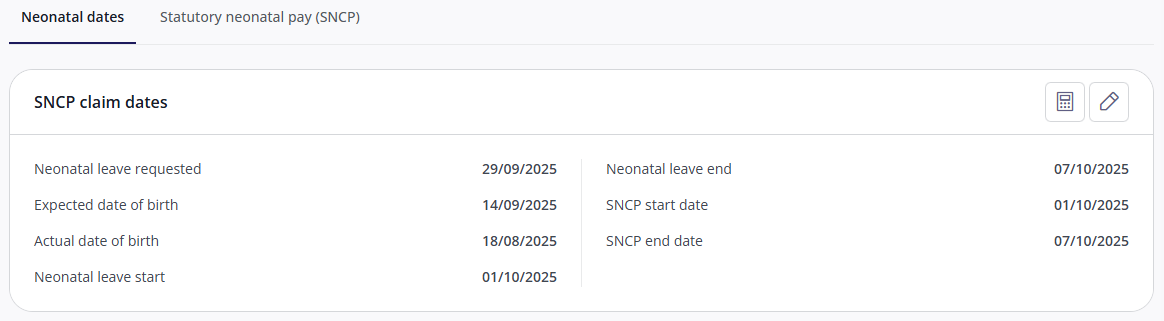
To change the dates, click the pencil icon. You can change Neonatal leave requested, Expected date of birth and Actual date of birth. None of them must be completed. The SNCP start and end dates are shown greyed out for reference.
If the dates can't be saved:
Message | What to do |
|---|---|
"The neonatal leave start date must be recorded on the absence before this claim can be saved." (or the same for the end date) | Add the missing date to the leave in the attendance calendar. |
"Attendance Period entered is outside of the Employment period…" | The employee's leaving date falls inside the leave. Check the leaving date against the leave. |
4. Calculate weeks
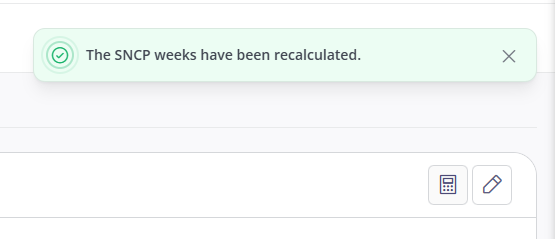
To rebuild the SNCP weeks straight away, click the calculator icon on the SNCP claim dates or SNCP summary card. It runs without asking you to confirm, and you'll see "The SNCP weeks have been recalculated".
Every week is rebuilt from the claim's dates, the statutory rate and the average weekly earnings. A week override is only kept if the rebuilt week covers exactly the same dates, so you may need to re-enter overrides afterwards.
If no SNCP is due, no weeks are created and you'll see a message explaining why. For example:
Message | What to do |
|---|---|
"Neonatal Leave start date in Calendar is before the Actual date of birth. Neonatal Care Pay not paid." | Check the Actual date of birth on the Neonatal dates tab. It must be on or before the leave start date. |
If the weeks are still empty, check the Relevant earnings (AWE) card. Weeks can't be created without average weekly earnings, for example if the employee wasn't paid during the set period.
5. SNCP summary
Click the Statutory neonatal pay (SNCP) tab. The SNCP summary card shows the figures payroll has calculated for the claim. You can't edit them.
Field | Meaning |
|---|---|
SNCP weeks due / SNCP weeks paid | The weeks of SNCP due for the claim, and paid so far. |
SNCP money due / SNCP money paid | The amount of SNCP due for the claim, and paid so far. |
SNCP recoverable | The amount of SNCP you can reclaim from HMRC. |
NIC compensation | The extra amount that employers who qualify for Small Employers' Relief can reclaim. |

6. Relevant earnings
SNCP is based on the employee's average weekly earnings over a set period before the baby was due. The Relevant earnings (AWE) card shows how this was worked out.
Field | Meaning |
|---|---|
Saturday of the 15th week before the week baby is due | The cut-off HMRC uses for the earnings period. Earnings paid after this date don't count. |
First day of set period / Last day of set period | The pay period the earnings are taken from: normally the 8 weeks, or 2 monthly pay days, up to the last normal pay day on or before that Saturday. |
Earnings in the set period | The employee's earnings in the set period. |
Derived average weekly earnings | The earnings in the set period converted to a weekly figure. |
Average weekly earnings | The figure SNCP is actually based on. This is the derived figure, unless it has been overridden. SNCP is paid at the statutory weekly rate, or 90% of this figure if that's lower. |
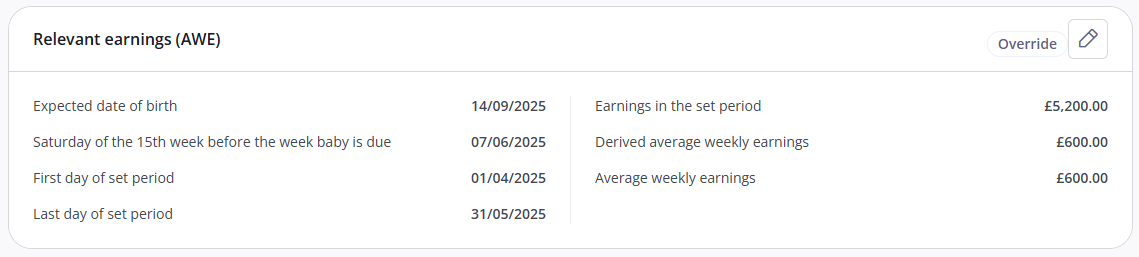
To override the average weekly earnings, click the pencil icon, enter the figure and click Save. The figure shows an Override label, and stays fixed when payroll is recalculated. To go back to the system's figure, open it again and click Reset to derived.
7. Weeks in neonatal pay period
Weeks in neonatal pay period lists each week with its SNCP amount: the amount due, the derived (calculated) amount, and any override with its reason. It's empty until the weeks have been calculated (see 4. Calculate weeks).
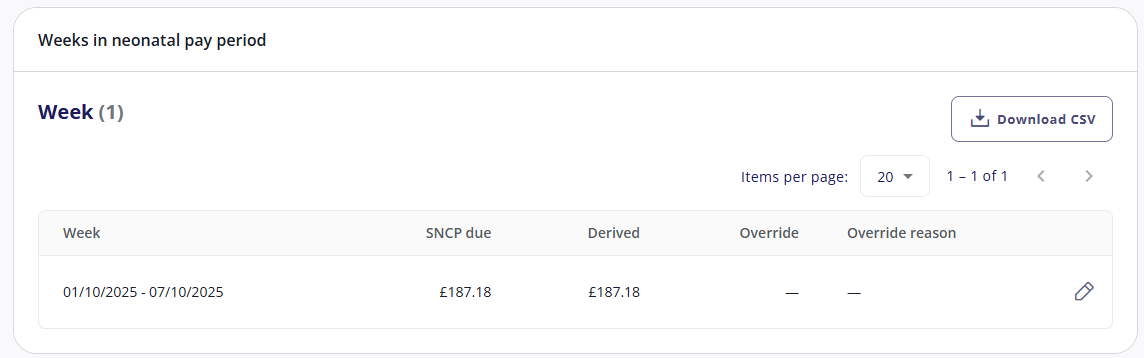
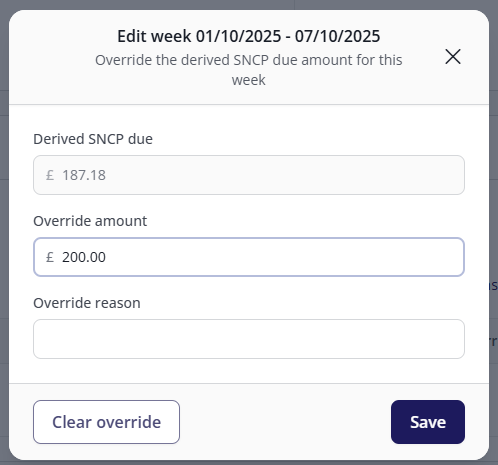
To override a week's amount, click the pencil icon on the week, enter the amount and a reason (up to 100 characters), and click Save. To remove an override, open the week and click Clear override. If you see "This week could not be found", the weeks were rebuilt while you had it open. Close it and open the week again.
To download the weeks as a spreadsheet, click Download CSV.
8. SNCP payments per period
SNCP payments per period shows what each payroll period paid: the date SNCP was paid up to, the weeks and amount of SNCP, the SNCP offset (SNCP can be offset against other gross pay at employer level), and the amounts you can reclaim. It's empty until a payroll run covering the leave has been calculated.

To change the date a period has paid SNCP up to, click the pencil icon on the row, enter the date in Pay SNCP up to and click Save. For example, you might do this when an employee leaves during their neonatal pay period, so the remaining SNCP is included in their final pay. Do this before you make them a leaver.
A correction period shares its date with the normal period it corrects, so changing the date on one row changes it on both. Changing the date on a closed period can create a correction.