This article describes the fields you complete when setting up an occupational parental pay (OPP) scheme in Cintra iQ. For step-by-step instructions, see Setting up an OPP scheme.
New Occupational Scheme form
This form appears when you click New to create a scheme. It sets the scheme's name, the leave it applies to, and how payments appear on the payslip.
Field | Description |
|---|---|
Scheme name | A name that identifies the scheme, for example the name of the policy it represents. |
Scheme applies to the following | The type of parental leave the scheme covers, either Maternity, Paterity, or Adoption. |
Create new / Select existing | Enter a name for a new addition heading. This is the payment heading shown on the employee's payslip for occupational pay made under this scheme. Alternatively, choose an addition heading you've already created. Only additional headings related to benefit schemes will be available. |
Reporting Group | The reporting group for the new addition heading. This decides where occupational pay appears in reports such as the Gross to Net report. This can only be applied when creating a new heading. |
Scheme options
These options appear on the Scheme Details tab of the Occupational Parental Pay Scheme window.
Note: When editing a scheme, a warning will be displayed if the scheme is already being used, as updating it could impact payment schedules.
Field | Description |
|---|---|
Apply Monthly Full Pay Adjustment | Adjusts the payment so that, while the employee is on full pay, their gross pay matches a normal month's salary. For example, if the agreement is six weeks at full pay, the employee expects their gross pay to stay the same for those six weeks. Because the period calculation rarely produces that exact amount, this option adds an adjustment to bring gross pay back to a normal month's salary, then re-adjusts in the following month. Selected: the adjustment is made so that pay balances with the monthly full pay figure. Cleared: no adjustment is made, and a month's pay is calculated on pro-rata calendar days, as with SMP. This option only applies when the SAP/SMP/SPP/SBP/SHPP/SNCP Pay Up To Default setting in Employer Details is To end of period. |
Apply Full Pay Cap to Payment Band | Selected: when statutory pay is paid on top of the full pay factor, the total is capped at full pay. Cleared: statutory pay is added even if the total exceeds full pay. |
Example: An employee's normal full pay is £250 a week. Their payment band is half pay plus SMP: £125 + £148.68 = £273.68, which is more than their full pay. To cap the payment at £250, select Apply Full Pay Cap to Payment Band.
Effective dates and service bands
These fields appear in the Payment Rates area of the Scheme Details tab.
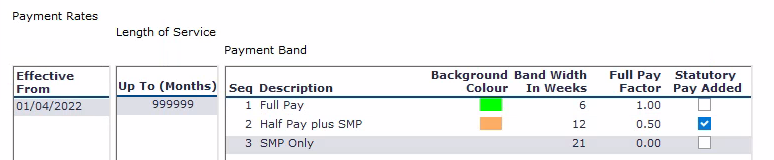
Field | Description |
|---|---|
Effective From | The date the payment agreement starts. Adding a new effective date lets you record a change to your agreement, for example moving from 26 weeks at half pay to 26 weeks at full pay, while keeping the earlier rates. |
Length of Service | The length of service, in months, that a set of payment bands applies to. Use this where your agreement pays differently depending on service, for example:
|
Tip: Set your final service band to a large number of months, such as 9999, so that every employee is covered.
Payment bands
Payment bands define what the employee is paid, and for how long. A typical OPP agreement combines a number of weeks at a factor of full pay with a number of weeks at statutory pay only.
Field | Description |
|---|---|
Sequence | The order in which the band is applied. |
Description | A name for the band, for example Full Pay, Half Pay or SMP Only. |
Band Width in Weeks | How many weeks the band lasts. Statutory maternity, paternity and adoption pay are all calculated in whole weeks, so occupational pay bands are also set in weeks. |
Full Pay Factor | The proportion of full pay paid during the band, for example:
|
Statutory Pay Added | Selected: statutory pay is added on top of the occupational pay. Cleared: statutory pay is offset against the occupational pay, reducing the occupational amount. |
Background Colour | The colour used to highlight the band on the payment schedule. |
Example: a typical maternity agreement
A common agreement is 12 weeks at full pay, 18 weeks at half pay plus SMP, then SMP only for the remaining weeks. The payment bands for this agreement would be set up as follows.
Sequence | Description | Band Width in Weeks | Full Pay Factor | Statutory Pay Added |
|---|---|---|---|---|
1 | Full Pay | 12 | 1.0 | Cleared |
2 | Half Pay + SMP | 18 | 0.5 | Selected |
3 | SMP Only | 9 | 0.00 | Cleared |
Full Pay tab
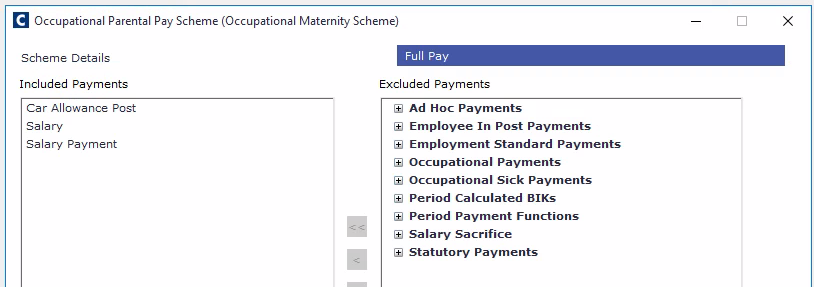
The Full Pay tab defines which addition headings make up the employee's full pay for this scheme. The headings you select are used in two ways:
To calculate the full pay figure used in the payment schedule.
To decide which pay elements are stopped (zeroised) while the schedule is in place and occupational and statutory parental payments are being made.