Once you have created Maternity Leave for the employee via the Calendar, starting on the first day of the leave, you can create maternity claims by performing the following:
Enter the Maternity Leave dates.
Generate the Maternity Pay Schedule.
View and edit the Maternity Payment details.
About the SMP Claim
Go to Cintra iQ: Employment Record > Forms > Parental Payments > Maternity Pay tab > Maternity record
Maternity Leave Calendar Events
The Maternity record only appears in the Maternity Pay tab once the leave is created as a Calendar Event. For more information, see How Do I Create a Maternity Leave Calendar Event?
About the Maternity Leave Dates & Kit Days tab
Within this tab you can enter and view the Maternity Leave dates.
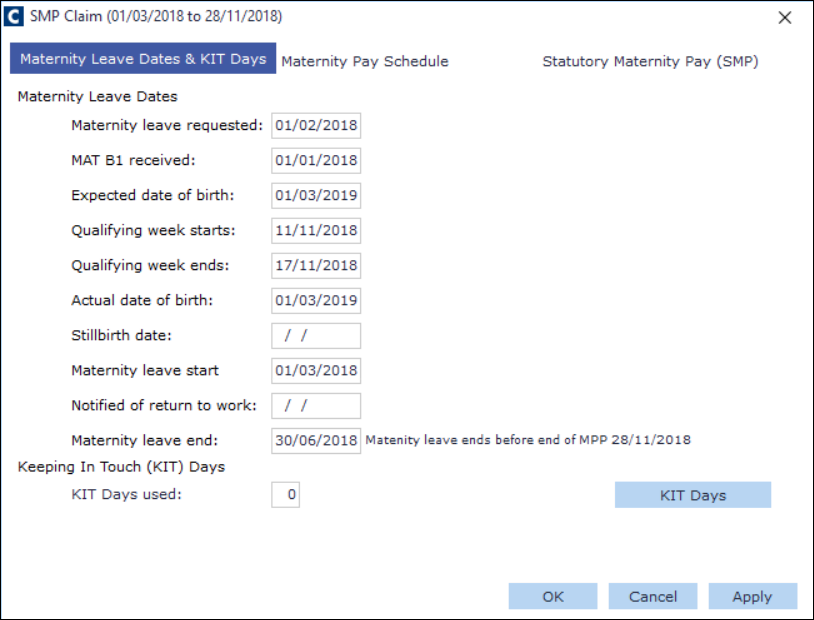
Maternity Leave Dates
Name | Description |
|---|---|
Maternity Leave Requested. | This date automatically appears after the start date of the maternity leave is entered as a Calendar event. |
MAT B1 received | Enter the date the form was received, to pay SMP. |
Expected date of birth | Enter the date of when the baby is expected to be born. |
Qualifying week starts | The start date in which the employee can qualify for SMP . |
Qualifying week ends | The end date in which the employee can qualify for SMP. |
Actual date of birth | Enter the date of the baby's birth. |
Stillbirth date | Enter the date of the baby's death. |
Maternity leave start | The date in which maternity leave starts. |
Notified of return to work | The date in which HR is notified that the employee is returning to work. |
Maternity leave end | The date in which maternity leave ends. |
Keeping in Touch (KIT) Days
KIT days are Keep In Touch days. This is so the employee can keep up with their work while they are on maternity.
Name | Description |
|---|---|
KIT Day Used | The number of KIT days assigned to the maternity leave through the Calendar event. |
About the Maternity Pay Schedule tab
Within this tab, you can assign payment scheme details, access the payment schedule, and view the breakdown of each weekly payment. 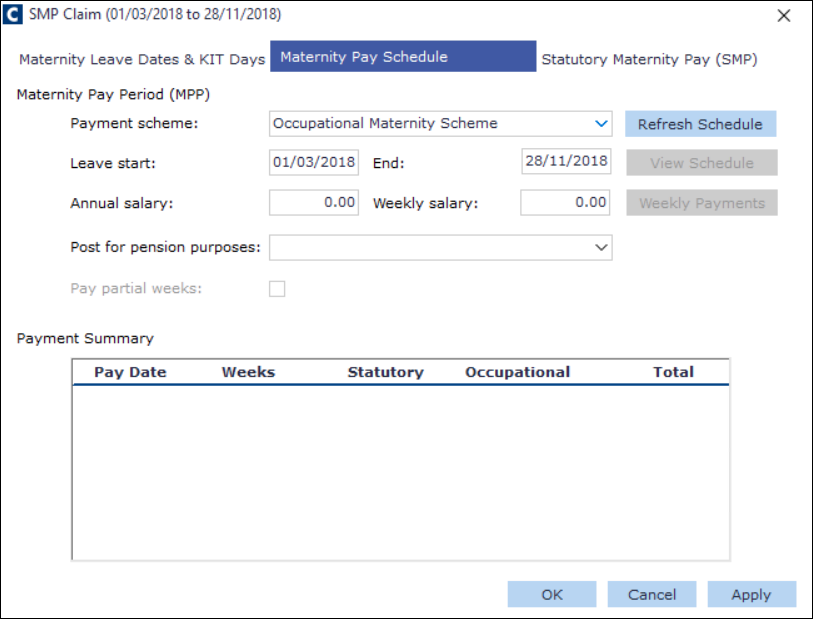
Maternity Pay Period (MPP)
Name | Description |
|---|---|
Payment Scheme | Select the desired Occupational Parental Pay scheme. See Setting up an OPP scheme. |
Leave start | This the date the maternity leave begins. |
End | This is the date the maternity leave finishes. |
Annual salary | This is the amount of the employee's annual salary. |
Weekly salary | This is the amount of the employee's annual salary broken down by week. |
Post for pension purposes | This is the name of the employee's pensionable post. |
Pay partial weeks | Select this to include partial weeks within the maternity pay calculation. Part weeks are calculated by taking the weekly rate, dividing by seven and then multiplying by the number of calendar days, regardless of what working pattern the employee has. This is because the statutory payment will always be calculated this way because it is defined by HMRC rules, and the occupational pay needs to follow suit. |
Maternity Pay Period (MPP)
Name | Description |
|---|---|
Payment Summary | This pane displays the maternity payment details. You can copy the details by right-click: Copy. |
Buttons
Click the buttons to perform various tasks.
Name | Description |
|---|---|
Refresh Schedule | Click this button to calculate the Maternity Pay. |
View Schedule | Click this button to view the Maternity Pay Schedule. |
Weekly Payments | Click this button to view the break down of the weekly payments and override a payment if necessary. |
About the Statutory Maternity Pay (SMP) tab
Within this tab, you can view and edit the statutory payment details.
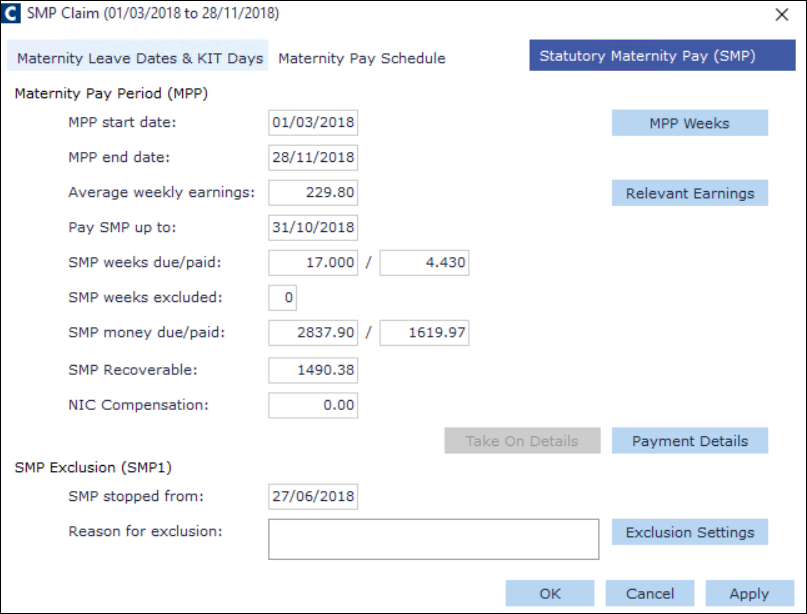
Maternity Pay Period (MPP)
Name | Description |
|---|---|
MPP start date | MPP start date |
MPP end date | MPP end date |
Average weekly earnings | Average weekly earnings |
Pay SMP up to: | Pay SMP up to : |
SMP weeks due/paid | SMP weeks due/paid |
SMP weeks excluded | SMP weeks excluded |
SMP money due/paid | SMP money due/paid |
SMP Recoverable | SMP Recoverable |
NIC Compensation | NIC Compensation |
SMP Exclusion (SMP1)
Name | Description |
|---|---|
SMP stopped from | This is the date the SMP has been stopped. |
Reason for exclusion | This field contains the reason why the employee has been excluded from further SMP payments. |
Buttons
Click the buttons to perform various tasks.
Name | Description |
|---|---|
MPP Weeks | Click this button to calculate the weeks for the maternity pay. |
Relevant Earnings | Click this button to override the average weekly earnings relevant to the earnings' amount. |
Payment Details | Use this button to edit all SMP payments per payroll period. |
Take On Details | Use this button to edit the Take On details. |
Exclusion Settings | Use this button to select a reason to exclude the employee's statutory maternity pay. |