You can import a credit card statement as a CSV file to reconcile your organisation's credit card expenses. Once imported, cardholders are notified and prompted to attach receipts to their transactions.
You can save a statement format so that you can reuse it for future imports rather than mapping fields each time.
Note: To use CSV imports, ensure Enable open banking is NOT selected in Setup > Settings > Accounting.
Importing a statement
Go to Banking > Transactions.
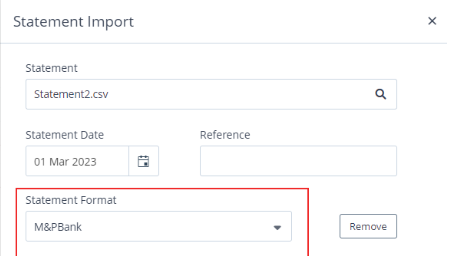
Click Import Statement. The Statement Import panel appears.
Upload your statement in .csv format.
.png)
Enter a Reference for the import, such as a date or bank name.
Select an existing Statement Format, or create a new one (see Creating a statement format below).
Click Import Statement.
Video: Importing a CSV statement
These videos were recorded in Capture Expense. Some screens and labels may look slightly different in Expenses, but the steps remain the same.
Creating a statement format
When creating a new format, you map the column headings in your CSV to the corresponding fields in Expenses. Required fields are marked with an asterisk.
Go to Banking > Transactions and click Import Statement.
Select Create New as the Statement Format.
Enter a Format Name. Format Currency and Delimiter will automatically be completed.
Match each Field to the corresponding Statement Column.
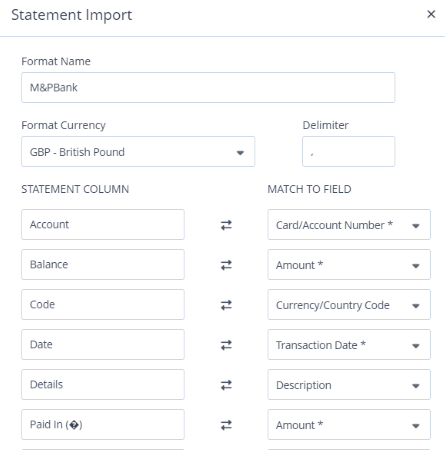
Click Save. The format is now available for future imports.
Note: To remove a format, click Remove in the Statement Format list.
Filtering transactions
You can filter imported transactions by:
Reference
Status: All, Incomplete, Submitted, Rejected, or Assign User (transactions not yet assigned to a cardholder)
Date range: using the From and To fields
Deleting an import
If you need to correct a mistake after importing, you can delete the entire import along with its related transactions and expenses.
Select the statement record in the Statement tab.
Click Delete Import.
If relevant, select Also remove the Import Format.
Click Remove.
Note: Only administrators can delete transactions. Individual users cannot delete credit card transaction records.