The integration doesn't create or change work patterns in payroll. Every work pattern used in HiBob must already exist in payroll, with exactly the same name, before an employee is assigned to it.
Setting up work patterns
For each work pattern in HiBob, set up a matching pattern in payroll with the same name. If you create a new pattern in HiBob later, set up the matching one in payroll too. See Setting up working pattern days using the work patterns wizard.
In HiBob, record hours against every day the employee works. HiBob treats a day with 0 hours as a non-working day.
In payroll, don't mark a day as a working day unless it has hours against it. Payroll allows this, but HiBob doesn't, so the two systems won't agree on the number of working days.
Assigning work patterns in HiBob
Assign each employee a pattern from the HiBob library, rather than setting hours against them individually.
HiBob option | Supported? | What happens in payroll |
|---|---|---|
Standard hours | Yes | The full-time work pattern is applied. |
Select from library | Yes | The chosen library pattern is applied, along with the employee's weekly hours and FTE. This works for both full-time and part-time employees, for example someone who works Monday to Wednesday when the full-time pattern is Monday to Friday. |
Flexible hours | Yes | The working days come from the full-time pattern, and the weekly hours come from the employee's FTE. For example, an employee on a Monday to Friday, 40-hour pattern with an FTE of 90% is set up on the Monday to Friday pattern with 36 weekly hours. |
Custom | No | The work pattern isn't synced, and an error appears. See Custom work patterns. |
Night shifts
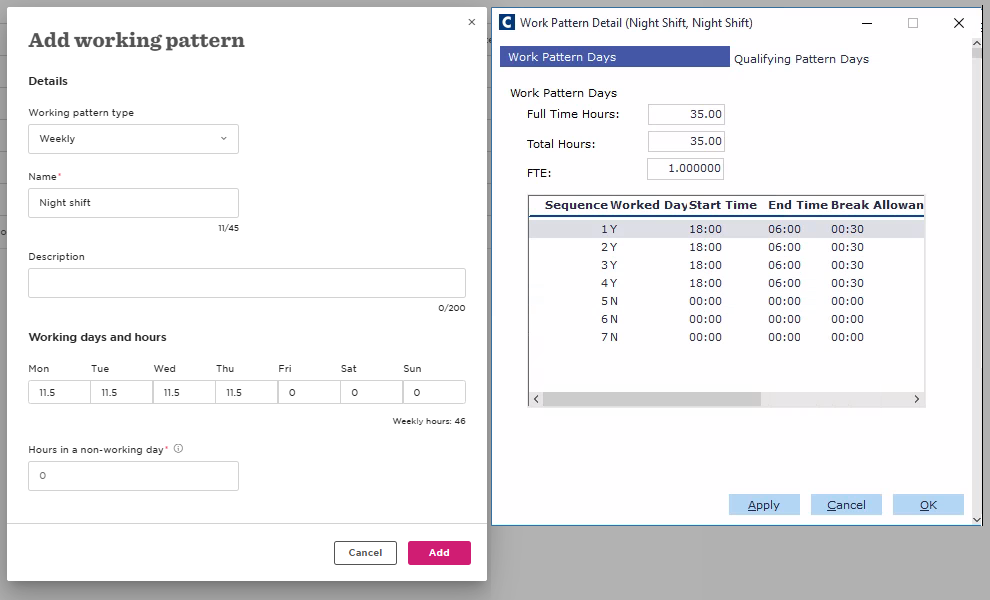
Payroll lets a shift run overnight, with all its hours counted against a single shift. In HiBob, record the total hours for the shift against a single day, even if some of them fall after midnight.
For example, if an employee works 18:00 to 06:00 with a 30-minute break, record 11.5 hours in HiBob on the day the shift starts.
Work pattern checks
On every sync, each HiBob work pattern that's assigned to at least one synced employee is compared with the matching pattern in payroll. The check compares:
The pattern name
The number of working days (days with more than 0 hours)
The hours on each day
If anything is different, a warning appears in the CintraHR log for each employee on that pattern. The warning names the pattern and the field that's different. The employee's other data still syncs as normal.
To clear the warning, update the pattern in payroll or in HiBob so they match. The check runs again on the next sync, even if nothing has changed in HiBob.
These aren't checked:
Start and end times, as HiBob doesn't hold them
Patterns that no synced employee uses
Personalised or flexible hours
Fortnightly patterns
Work pattern errors
A work pattern error only affects the employee's work pattern. All their other data, and all data for other employees, still syncs as normal.
Work pattern not found
This error appears when an employee's HiBob work pattern doesn't exist in payroll. Set up the pattern in payroll with the same name, then run the sync again.
Custom work patterns
A custom work pattern sets hours against an individual employee rather than using a pattern from the library. Payroll has no equivalent, so there's no pattern name to match, and the work pattern isn't synced. The integration doesn't use the employee's full-time pattern instead, as it might give payroll the wrong working days.
To fix it:
Create the work pattern in the HiBob library.
Assign it to the employee in place of the custom pattern.
Make sure a pattern with the same name exists in payroll.
Run the sync again. The work pattern is applied and the error clears.
Existing work patterns at go-live
Work patterns set up in payroll when your payroll was onboarded are matched with HiBob automatically, even though the effective dates are different. See HiBob integration: Matching existing records at go-live.