The Payment Status Report provides a detailed list of all payment runs, showing their current status, submission and pay dates, amounts, and authorisation details. Use this report to track, review, and manage payment progress across your organisation.
In the Bureau tab, within the Payments section, click Salary payment schedule.
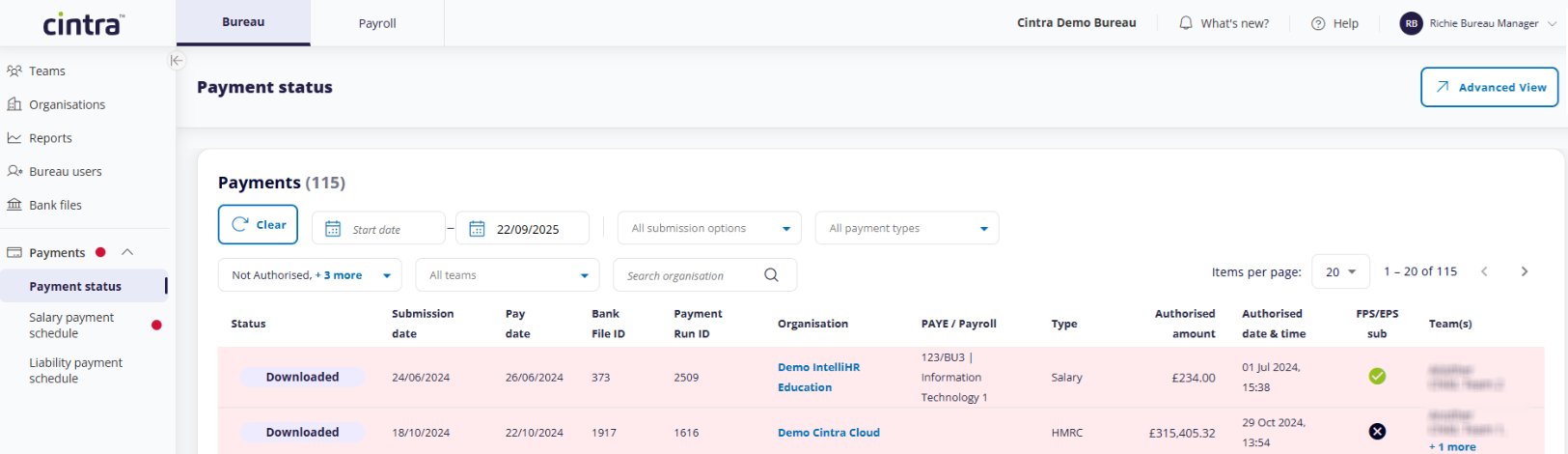
Filter the list of payments
By default, the Payments list displays every previous and planned payment. However, you can filter this list to locate the payment you require:
Dates: Enter a Start and/or End Date. This will filter the payments by their Submission date only.
Submission options: View only payments that have / have not been FPS / EPS submitted.
All payment types: Filter the list by payments to HMRC, salary, and/or third parties.
Payment statuses: For a full explanation, see Payment status definitions.
Teams: You can check for payments assigned to one or more teams. By default, all teams are shown.
Keyword search: This will search the name of the organisation only.
To return to the full list of payments, click Clear.
Advanced View / Report
From the list of payments, click Advanced View at the top-right to launch the Bureau Payments report. For more information on customising this report, see Introduction to the Report Customisation screen.