Cintra People is your online system for managing employee information, payroll, and day‑to‑day people tasks. It brings together HR and payroll functions in one secure platform, giving employees, managers, HR teams, and payroll staff an easy way to keep records up to date, complete tasks, and manage essential activities.
Products in Cintra People
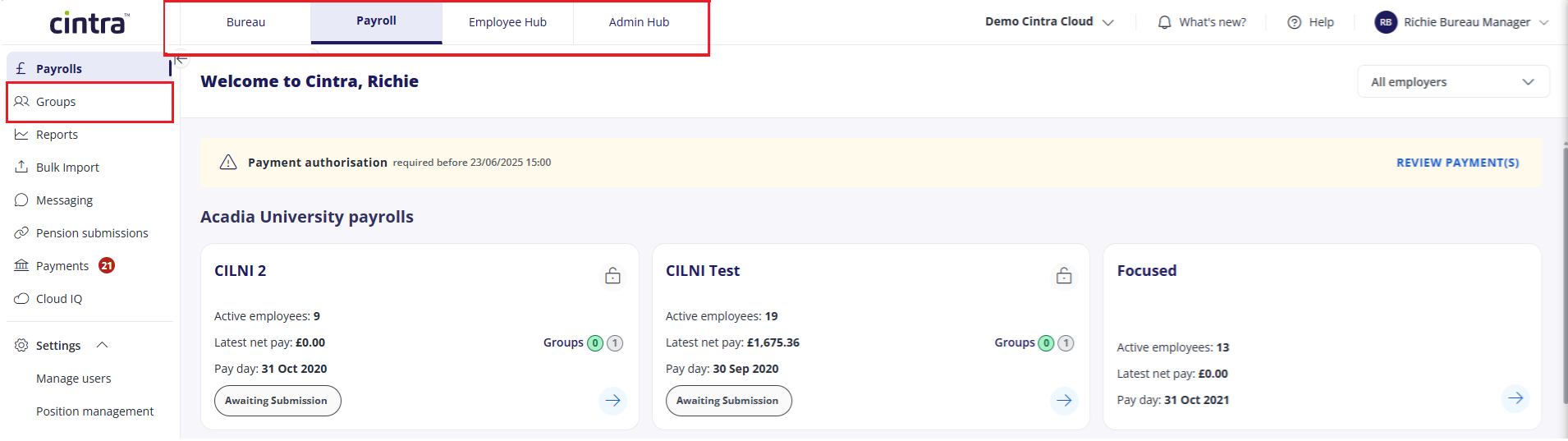
The full Cintra People Payroll product has the following components
Cintra People Payroll: manages all your pay‑related information and helps payroll teams process pay accurately.
Payroll users can manage pay details, make additions / deductions, and submit payrolls.
Payroll users can also access and customise a wide variety of useful reports and dashboards.
Cintra Bureau: An additional module of Cintra People bureau teams manage payroll for multiple client organisations. This is done using both Cintra People Payroll and Cintra iQ.
Cintra Groups: An additional module of Cintra People Payroll that lets you manage input of employee data across multiple locations.
Expenses: If your organisation has this additional module, employees can raise, submit, and approve expense claims directly within Cintra People Payroll. Employee data and reimbursements are kept in sync with Payroll automatically.
Employee Hub: With this component, all users can view their payslips, P60s and pay history, as well as request holidays.
Admin Hub: If your organisation uses Employee Hub, Admin Hub lets you configure holidays and absences.
Your role in Cintra People
What you can do in Cintra People depends on your role, and whether you have access to the Cintra Groups, Bureau, and/or Employee Hub.
Employees: View your payslips, update personal details, request holidays, and complete tasks assigned to you.
Managers: Everything employees can do, plus approve holiday requests, view your team's information, and complete management tasks.
Payroll user: Process pay runs, manage pay-related details (pensions, benefits, deductions), run payroll reports, and ensure accurate payments. Access employee pay information that originates from HR.
Cintra Groups user: Access and manage data across multiple linked organisations within a group structure.
Cintra Bureau user: Access and work on the client payrolls they have been assigned, within the limits set by their bureau team's access controls.
System administrators: Manage users, roles and system-wide settings for their organisation.
Your organisation controls which features you can access based on your role.
Basic tasks and information to get you started
If you've not yet logged in, find out how to Sign in to Cintra People.
If you want to find your way about the system, go to Find your way round Cintra People Payroll.
If you're an employee who wants to perform tasks such as booking a holiday or viewing your payslip, see Employee Hub for employees.
If you'd like to know more about the different areas of Cintra People, expand the relevant categories in the table of contents to view more information.
Need more help?
Visit Help and support.