Change your phone number
Note: If your mobile phone number is incorrect and you CANNOT log in Cintra People, you will need to contact your Cintra People administrator. Unfortunately, Cintra Support CANNOT change phone numbers.
You can only update your mobile phone number while logged in to Cintra People.
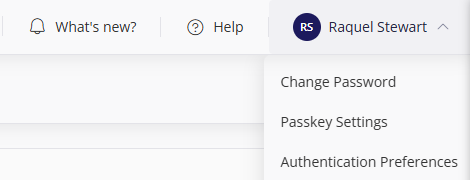
Click your avatar / initials at the top-right of the screen, then select Authentication Preferences.
Enter your new phone number, then click Save Preferences.
Warning!
You must ensure you enter the phone number correctly. If you receive SMS codes to login and enter a phone number you don't have access to, you will be locked out your Cintra People account and you will have to ask your administrator to help you regain access.
Change other personal details
To change other details about yourself, including your contact and payment details:
In the side menu, select Profile.
Within the Personal Profile section, you can change your details in the tabs (and sub-tabs).
A warning will display if your profile is missing any mandatory information, such as address or phone number.
If you make any changes, remember to click Save.
.png)
Note: Your organisation may prevent you from editing some fields. Speak to your HR administrator for more information.