The Statutory Deductions tab lets you view and manage all the information relating to how much is taken from an employee's pay each period, including tax, National Insurance, student loans, and court orders.
To access statutory deductions, open a payroll, edit the employee, then select the Statutory Deductions tab.

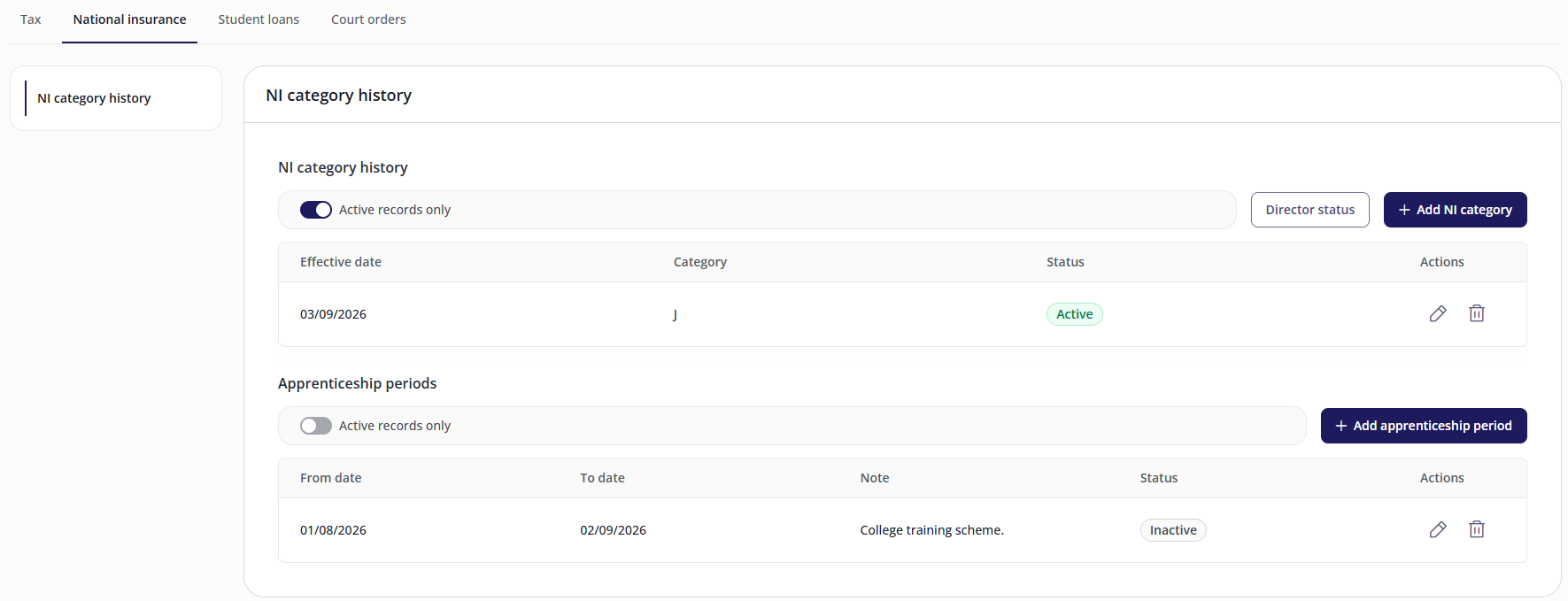
An employee's National insurance tab holds three pieces of information: their NI category history, their director status for the current tax year, and any apprenticeship periods.
NI category history
The NI category history shows every National Insurance category letter an employee has held, with the date each one took effect, the date it stopped, and whether it's active, upcoming, or finished.
Switch on Active records only to see just the current and upcoming categories, or switch it off to see the full history, including an extra End date column.
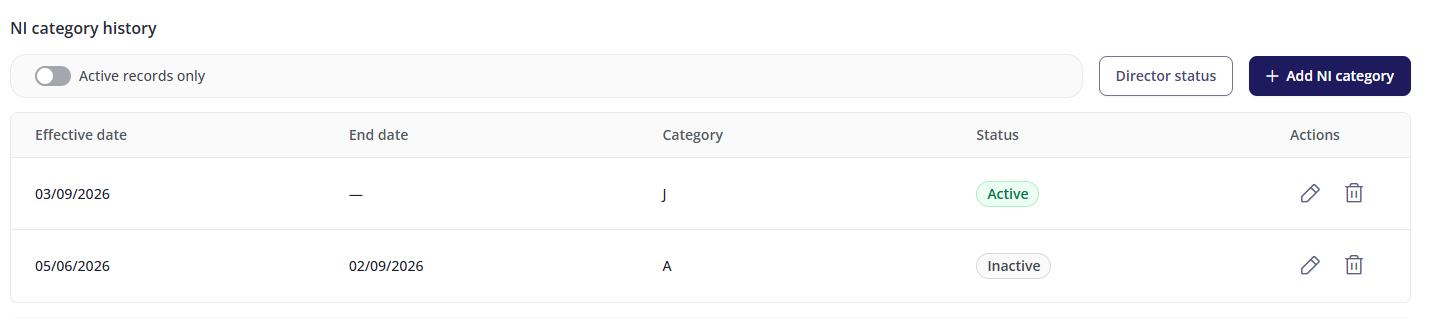
If no category has been recorded for an employee, they're treated as category A by default.
Adding an NI category
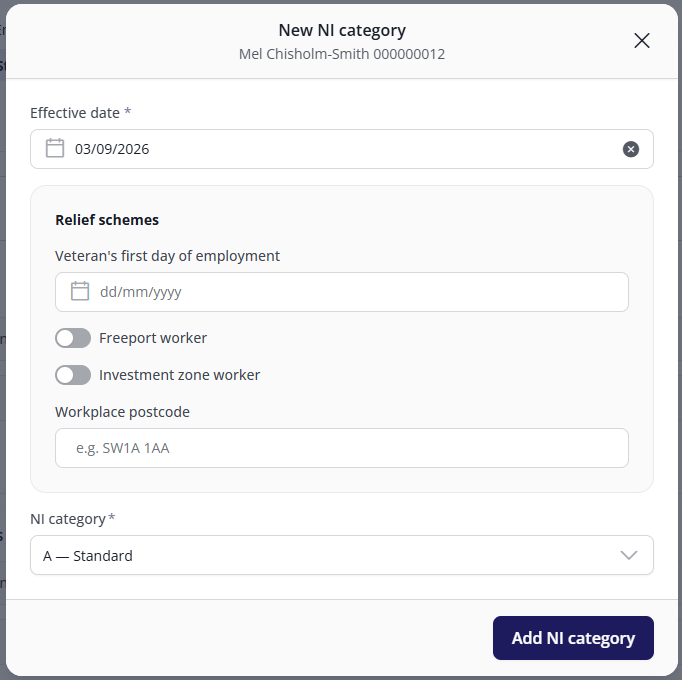
Select Add NI category.
Enter the effective date. The list of available NI categories only populates once this date is entered.
You cannot enter an effective date for a previous tax year. This must be done by your Payroll team.
Enter any relief scheme information.
Choose an NI category from the drop-down.
Select Add NI category to save.
The neighbouring NI categories' start and end dates adjust automatically around the new record. A category has no end date of its own, it simply runs until the next one starts.
Backdating
Changing a date so it lands in a pay period that's already been processed shows a warning but is still allowed. If the employee has left, how far back a change can reach is limited, and a backdated change may be pulled forward to a date the system will accept.
Relief schemes: Veterans, Freeport and Investment zone workers
When adding an NI category, three relief scheme options may be relevant, each of which qualifies an employee for a different employer NI relief:
Veteran's first day of employment: the date the employee started their first civilian job after leaving the armed forces, used to claim the employer NI relief available for veterans in their first year of civilian employment.
Freeport worker: the employee works at a Freeport special tax site, and the employer is claiming the reduced employer NI rate available for Freeport-based employees. Requires a workplace postcode.
Investment zone worker: the employee works at an investment zone special tax site, and the employer is claiming the reduced employer NI rate available for investment zone-based employees. Requires a workplace postcode.
An employee can be a Freeport worker or an investment zone worker, but not both.
NI category letters
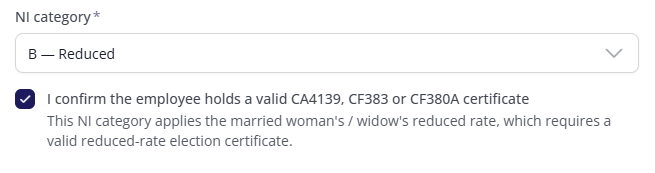
Which NI category letters are available to an employee depends on HMRC eligibility rules, for example, Freeport workers must use F, I, L or S, and employees over State Pension age must use C, K, W, X or S. These rules can change, so for the current list of category letters and who they apply to, see HMRC's guidance on National Insurance category letters.
Depending on the category you select, you may be required to confirm some conditions.
Director status
Director status is held per tax year and is set independently of an employee's NI category history.
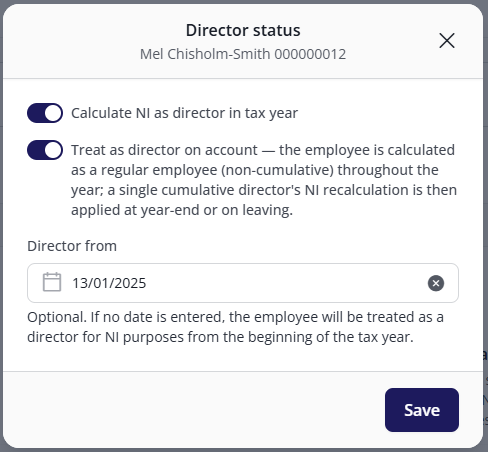
Select Director status.
Switch on Calculate NI as director in tax year if the employee is a director.
If the employee's director NI should be spread across the year rather than calculated cumulatively, switch on Treat as director on account. With this on, the employee is calculated as a regular employee (non-cumulative) throughout the year, and a single cumulative director's NI recalculation is applied at year-end or on leaving.
Optionally, enter a Director from date. If left blank, the employee is treated as a director for NI purposes from the start of the tax year.
Select Save.
Turning off Calculate NI as director in tax year also turns off Treat as director on account.
Apprentice periods
Apprentice periods record the date ranges in which an employee is an apprentice. This is what makes the apprentice NI categories available for that employee.
Select Add apprenticeship period.
Enter the start and end dates.
Select Save.
An apprentice period can't overlap another apprentice period, and must fall within the employee's employment dates.
FAQs
I've added a new NI category, but the previous one's end date has changed. Is that right?
Yes. A category has no end date field of its own, as it runs until the next one starts. Adding, editing, or deleting a category automatically adjusts the neighbouring records' dates.
Why is a category letter not accepted for an employee?
Category letters are restricted by HMRC eligibility rules (for example, age, apprenticeship, or Freeport/investment zone status). See HMRC's guidance on National Insurance category letters for the current rules.
Why is the list of NI categories empty?
The category list only populates once you've entered an effective date. Enter a date first, then select the category field again.
Can I make a manual adjustment to an employee's NI figures from this screen?
No. Manual NI adjustments aren't available in Cintra People Payroll and must be done in Cintra iQ.
Why can't I edit NI for this employee?
There are a few possible reasons:
You have view-only access. If your role can view employees but not edit them, you'll see the NI category history, director status, and apprentice periods, but no buttons will be shown.
The payroll is being processed. While a payroll run is in progress, all Statutory deductions screens lock for everyone, including users who can normally edit. A banner explains why.
RTI is active for the payroll. As above . A temporary lock with its own explanatory banner.